GDB MI와 DAP 프로토콜 — IDE 통합 인터페이스 분석
VSCode·PyCharm·Neovim·Emacs가 모두 같은 디버거에 붙는 비결은 두 프로토콜에 있습니다. MI (GDB/MI — GDB Machine Interface)가 GDB 측 표준, DAP (Debug Adapter Protocol)가 IDE 측 표준. 두 프로토콜이 한 어댑터에서 매개되어 어떤 IDE에서든 어떤 디버거에 붙을 수 있습니다.
이 장은 두 프로토콜의 정체와 그 사이 매개의 흐름을 다룹니다.
#GDB/MI — Machine Interface
CLI((gdb) 프롬프트의 일반 명령)는 사람용. 출력이 자유로워 기계 파싱이 어려움. MI는 기계용: 구조화된 명령·응답.
#활성화
$ gdb --interpreter=mi3 ./my_prog=thread-group-added,id="i1"=cmd-param-changed,param="auto-load safe-path",value="$debugdir:$datadir/auto-load:/"(gdb)(gdb) 프롬프트가 보이지만 내부는 MI 모드. mi, mi2, mi3이 버전 — mi3이 현재 표준.
#명령 형식
[token]-command [args]token— 옵션. 응답에서 같이 돌아와 비동기 매핑에 사용.command— MI 명령 (-exec-run,-break-insert등).
(gdb)2-exec-run2^running*running,thread-id="all"(gdb)#응답 종류
| Prefix | 의미 |
|---|---|
^done,... | 명령 성공 + 결과 |
^running | 명령 시작 (비동기) |
^error,msg=... | 오류 |
^exit | GDB 종료 |
*stopped,... | async stop event |
*running,... | async start event |
=... | 알림 (thread, library 로드 등) |
~"..." | console 출력 (사용자 메시지) |
@"..." | target 출력 (디버기 stdout) |
&"..." | log 출력 |
*stopped/*running/=...이 프로세스 측 이벤트. IDE가 이를 받아 UI를 갱신.
#자주 쓰이는 명령
-exec-run : run-exec-continue : continue-exec-interrupt : 정지-exec-step : step-exec-next : next-exec-finish : finish
-break-insert main : break main-break-insert -t main : tbreak-break-delete 1 : delete 1-break-enable / -disable-break-condition 1 i > 100
-stack-list-frames : bt-stack-list-arguments-stack-list-variables-stack-select-frame 2
-thread-list-ids-thread-select 3-thread-info
-data-evaluate-expression "x + 1"-data-read-memory 0x401200 x 1 1 16-data-write-memory 0x401200 x 1 1 0xff
-var-create name * expression : watch 변수 생성-var-update * : 모든 watch 갱신-var-list-children name-var-evaluate-expression name-var-delete name
-file-exec-and-symbols ./prog-target-attach 12345-target-detach전체 명세는 GDB/MI 문서. 200+ 명령.
#응답 예 — backtrace
3-stack-list-frames3^done,stack=[ frame={level="0",addr="0x000055555555581a",func="process", file="main.cpp",fullname="/home/me/main.cpp",line="42"}, frame={level="1",addr="0x000055555555591b",func="handle", file="main.cpp",fullname="/home/me/main.cpp",line="60"}, frame={level="2",addr="0x0000555555555a12",func="main", file="main.cpp",fullname="/home/me/main.cpp",line="10"}]IDE는 이 구조에서 각 frame을 추출해 콜스택 패널에 표시.
#응답 — 변수 트리
4-var-create v1 * vec4^done,name="v1",numchild="3",value="std::vector of size 3", type="std::vector<int, std::allocator<int> >", has_more="0",displayhint="array"displayhint="array"가 pretty-printer가 알려 준 정보. IDE는 트리 형태로.
사용자가 노드 펼치면.
5-var-list-children v15^done,numchild="3",children=[ child={name="v1.0",exp="[0]",numchild="0",value="1",type="int"}, child={name="v1.1",exp="[1]",numchild="0",value="2",type="int"}, child={name="v1.2",exp="[2]",numchild="0",value="3",type="int"}]지연 로드 패턴 — 펼친 노드만 다시 요청.
#Asynchronous notifications
*stopped,reason="breakpoint-hit",disp="keep",bkptno="1", thread-id="1",frame={addr="0x...",func="main",file="main.cpp",line="10"}, stopped-threads="all",core="3"정지 시 IDE에 상세 정보 전송. reason은 breakpoint-hit, watchpoint-trigger, end-stepping-range, signal-received, exited, exited-signalled 등.
#CLI ↔ MI 매핑
| CLI 명령 | MI 명령 |
|---|---|
run | -exec-run |
continue | -exec-continue |
break main | -break-insert main |
info threads | -thread-info |
bt | -stack-list-frames |
print x | -data-evaluate-expression x |
next | -exec-next |
- 접두사 + 이름 약간 다름. 거의 1
#DAP — Debug Adapter Protocol
MI가 GDB 측이라면 DAP는 IDE 측. Microsoft가 2016년 도입, 이제 거의 모든 IDE의 표준.
핵심 아이디어: IDE가 한 프로토콜만 알면 어떤 디버거도 쓸 수 있게. 어댑터가 DAP ↔ 디버거 프로토콜(MI/RSP/자체)을 매개.
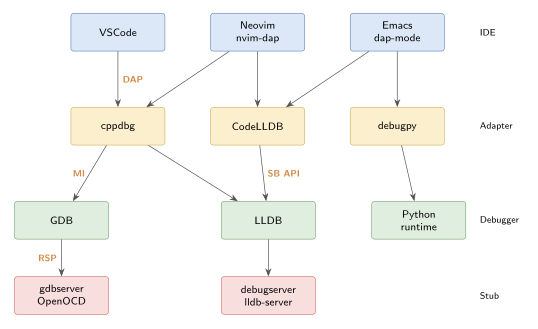
#전송
JSON-RPC over TCP/stdio. 메시지는 길이 header + JSON body.
Content-Length: 119\r\n\r\n{"seq":1,"type":"request","command":"initialize", "arguments":{"clientID":"vscode","linesStartAt1":true}}#메시지 종류
request : 클라이언트 → 어댑터, 응답 기대response : 어댑터 → 클라이언트, request에 대한 답event : 어댑터 → 클라이언트, 비동기 알림#초기 핸드셰이크
// 1. Initialize{"seq": 1, "type": "request", "command": "initialize", "arguments": {"clientID": "vscode", "adapterID": "cppdbg", "linesStartAt1": true, "columnsStartAt1": true, "pathFormat": "path"}}
// 어댑터 응답{"seq": 2, "type": "response", "request_seq": 1, "success": true, "command": "initialize", "body": { "supportsConfigurationDoneRequest": true, "supportsFunctionBreakpoints": true, "supportsConditionalBreakpoints": true, "supportsHitConditionalBreakpoints": true, "supportsEvaluateForHovers": true, "exceptionBreakpointFilters": [], "supportsStepBack": false, "supportsSetVariable": true, "supportsRestartFrame": false, "supportsGotoTargetsRequest": false, "supportsStepInTargetsRequest": false, "supportsCompletionsRequest": true, "supportsModulesRequest": true, ... }}
// 어댑터가 보내는 첫 이벤트{"seq": 3, "type": "event", "event": "initialized"}supports* 응답이 그 어댑터가 무엇을 지원하는지. VSCode가 UI를 적응 — 미지원 기능 버튼이 회색.
#Launch / Attach
{"seq": 4, "type": "request", "command": "launch", "arguments": { "program": "/path/to/my_prog", "args": ["arg1", "arg2"], "cwd": "/home/me", "env": {"DEBUG": "1"}, "stopOnEntry": false, "MIMode": "gdb", // cppdbg 특수 "setupCommands": [ {"text": "-enable-pretty-printing"} ] }}
// Attach{"command": "attach", "arguments": {"processId": 12345}}#브레이크포인트 설정
{"command": "setBreakpoints", "arguments": { "source": {"path": "/home/me/main.cpp"}, "breakpoints": [ {"line": 42, "condition": "i > 100", "hitCondition": ">= 5"}, {"line": 60, "logMessage": "x = {x}"} // logpoint ] }}
// 응답{"command": "setBreakpoints", "body": { "breakpoints": [ {"verified": true, "line": 42, "id": 1}, {"verified": true, "line": 60, "id": 2} ] }}logMessage가 VSCode의 logpoint. 어댑터가 commands silent printf 등으로 변환.
verified: false면 그 위치에 BP 설치 실패 — 회색으로 표시.
#Function breakpoint
{"command": "setFunctionBreakpoints", "arguments": {"breakpoints": [{"name": "main"}, {"name": "process"}]}}#Data breakpoint (watchpoint)
{"command": "setDataBreakpoints", "arguments": {"breakpoints": [ {"dataId": "x@0x7fffffff", "accessType": "write"} ]}}#Stack trace
{"command": "stackTrace", "arguments": {"threadId": 1, "startFrame": 0, "levels": 20}}
// 응답{"body": { "stackFrames": [ {"id": 1000, "name": "process(args)", "line": 42, "column": 1, "source": {"path": "/home/me/main.cpp"}, "instructionPointerReference": "0x401234"}, ... ], "totalFrames": 3}}#Variables — 트리
// 1. 프레임의 스코프{"command": "scopes", "arguments": {"frameId": 1000}}
// 응답{"body": {"scopes": [ {"name": "Locals", "variablesReference": 1001, "expensive": false}, {"name": "Arguments", "variablesReference": 1002, "expensive": false}, {"name": "Registers", "variablesReference": 1003, "expensive": true}]}}
// 2. 스코프 안의 변수{"command": "variables", "arguments": {"variablesReference": 1001}}
// 응답{"body": {"variables": [ {"name": "i", "value": "42", "type": "int", "variablesReference": 0}, {"name": "v", "value": "std::vector of size 3", "type": "std::vector<int>", "variablesReference": 2001, "namedVariables": 0, "indexedVariables": 3}]}}
// 3. 사용자가 v를 펼치면{"command": "variables", "arguments": {"variablesReference": 2001}}{"body": {"variables": [ {"name": "[0]", "value": "1", "type": "int", "variablesReference": 0}, {"name": "[1]", "value": "2", "type": "int", "variablesReference": 0}, {"name": "[2]", "value": "3", "type": "int", "variablesReference": 0}]}}재귀적 variables 요청이 VSCode의 변수 트리를 지연 로드로 그리는 메커니즘.
indexedVariables: 3이 pretty-printer의 display_hint = "array"에서 옴.
#Evaluate
{"command": "evaluate", "arguments": {"expression": "x + 1", "frameId": 1000, "context": "watch"}}
// 응답{"body": {"result": "43", "type": "int", "variablesReference": 0}}context: "watch" (Watch 패널), "repl" (Debug Console), "hover" (마우스 호버), "clipboard".
#진행 명령
{"command": "continue", "arguments": {"threadId": 1}}{"command": "next", "arguments": {"threadId": 1}}{"command": "stepIn", "arguments": {"threadId": 1, "targetId": 0}}{"command": "stepOut", "arguments": {"threadId": 1}}{"command": "pause", "arguments": {"threadId": 1}}각각 thread별로. 멀티스레드 디버깅 시 어느 스레드를 진행하는지 명시.
#이벤트
// 정지{"type": "event", "event": "stopped", "body": {"reason": "breakpoint", "threadId": 1, "allThreadsStopped": true, "hitBreakpointIds": [1]}}
// 진행{"type": "event", "event": "continued", "body": {"threadId": 1, "allThreadsContinued": true}}
// 출력{"type": "event", "event": "output", "body": {"category": "stdout", "output": "Hello\n"}}
// 스레드 변경{"type": "event", "event": "thread", "body": {"reason": "started", "threadId": 5}}
// 종료{"type": "event", "event": "terminated"}{"type": "event", "event": "exited", "body": {"exitCode": 0}}reason: step, breakpoint, exception, pause, entry, goto, function breakpoint, data breakpoint, instruction breakpoint.
#Adapter — DAP ↔ MI 매개
VSCode의 cppdbg 어댑터가 어떻게 동작하는가.
VSCode ─DAP─> cppdbg adapter ─MI─> gdb (--interpreter=mi3) │ ▼ 디버기launch request 받으면 → gdb --interpreter=mi3 program 실행 + -exec-run. stackTrace request → -stack-list-frames. evaluate → -data-evaluate-expression.
#CodeLLDB는 다름
CodeLLDB 어댑터는 직접 LLDB SB API를 호출. MI를 거치지 않음. 그래서 macOS·Rust·Swift 환경에서 더 빠르고 안정.
VSCode ─DAP─> CodeLLDB adapter ─SB API─> lldb#debugpy (Python)
Python의 debugpy도 DAP 어댑터 + Python 디버거 내장.
VSCode ─DAP─> debugpy ─PyFrame inspection─> 사용자 Python 코드거의 모든 언어가 자체 DAP 어댑터를 제공: Go (delve --dap), Rust (codelldb 또는 rust-analyzer), C# (netcoredbg), Java (java-debug), …
#직접 DAP 사용 — Neovim
nvim-dap은 DAP 클라이언트. VSCode 설정과 거의 같은 configuration.
local dap = require('dap')
dap.adapters.cppdbg = { id = 'cppdbg', type = 'executable', command = '/usr/bin/OpenDebugAD7',}
dap.configurations.cpp = { { name = "Launch", type = "cppdbg", request = "launch", program = function() return vim.fn.input('Path to executable: ', vim.fn.getcwd() .. '/', 'file') end, cwd = '${workspaceFolder}', stopAtEntry = false, MIMode = 'gdb', },}Lua로 launch.json 동치를 정의. 동일 어댑터를 사용하므로 VSCode와 같은 경험.
#Emacs — dap-mode
(use-package dap-mode :after lsp-mode :config (dap-auto-configure-mode) (require 'dap-cpptools) (require 'dap-lldb))DAP 클라이언트 + UI. dap-cpptools/dap-lldb 모듈이 어댑터 등록.
#DAP 어댑터 만들기
새 언어·런타임의 디버거를 만들 때 DAP 어댑터를 작성하면 모든 IDE에서 즉시 동작.
기본 흐름:
- stdin에서 JSON-RPC request 읽기.
- command 분기 처리.
- response를 stdout으로.
- event를 stdout으로 (비동기).
debug-adapter-protocol-node 같은 라이브러리가 boilerplate 제거.
// TypeScript 예import { DebugSession, InitializedEvent, StoppedEvent, ... } from 'vscode-debugadapter';
class MyAdapter extends DebugSession { protected initializeRequest(response, args) { response.body.supportsConfigurationDoneRequest = true; this.sendResponse(response); this.sendEvent(new InitializedEvent()); }
protected launchRequest(response, args) { this.startDebugger(args.program); this.sendResponse(response); }
protected setBreakPointsRequest(response, args) { // BP 설정 로직 this.sendResponse(response); }
// ...}
DebugSession.run(MyAdapter);#MI vs DAP 한 표
| MI | DAP | |
|---|---|---|
| 위치 | GDB 측 | IDE 측 |
| 형식 | 텍스트 (key=value) | JSON-RPC |
| 도입 | 1990s | 2016 |
| Async | *notification | event |
| 변수 트리 | -var-* 명령 | variables 재귀 |
| 표준 | GDB가 정의 | MS가 정의 |
| 구현 디버거 | GDB, LLDB(부분) | GDB(via cppdbg), LLDB(via lldb-vscode), debugpy, delve, … |
#정리
- MI = GDB의 기계용 인터페이스. 거의 모든 명령에
-cmd형식. - DAP = IDE ↔ 디버거 표준 (JSON-RPC).
- IDE 어댑터가 DAP ↔ MI (또는 SB API, 자체 프로토콜) 매개.
- 변수 트리는 재귀적 variables 요청으로 지연 로드.
displayhint = "array"같은 pretty-printer 메타가 IDE 트리 모양 결정.- cppdbg = GDB/LLDB via MI. CodeLLDB = LLDB via SB. debugpy = Python 내장.
- Neovim·Emacs도 같은 DAP 어댑터로 동일 경험.
- 새 언어 디버거는 자체 DAP 어댑터로 모든 IDE에 즉시 통합.
#다음 장 예고
Ch 6 (마지막) — 프런트엔드 비교. TUI / cgdb / dashboard / gef / VSCode / nvim-dap / Cortex-Debug.
#관련 항목
관련 글
GDB 프런트엔드 비교 — TUI·cgdb·dashboard·gef·IDE
터미널부터 IDE까지. 내장 TUI, cgdb, gdb-dashboard, gef/pwndbg, VSCode, nvim-dap, Cortex-Debug 비교.
같은 시리즈에서 이어 읽기
GDB FrameDecorator·Unwinder — 콜스택 가공과 JIT 지원
Frame filter, FrameDecorator로 콜스택 변형, custom unwinder로 JIT 코드 추적.
같은 시리즈에서 이어 읽기
GDB Remote Serial Protocol 분석 — 디버거-타겟 통신 메커니즘
GDB가 원격 스텁과 주고받는 ASCII 패킷의 모든 것. 패킷 형식, qSupported 협상, vCont, 멀티 패킷, RLE.
공통 태그 기반 추천