ELF 포맷 분해 — Section·Segment·Symbol Table 구조 추적
DWARF를 깊이 다루기 전에 그 컨테이너인 ELF부터 봅니다. Linux·BSD·일부 임베디드 환경의 표준 바이너리 포맷. 50년 가까이 거의 변함없이 살아남았고, 디버그 정보·심볼·실행 가능 코드·동적 링크 메타데이터를 한 파일에 모두 담는 결정적인 추상화입니다.
이 시리즈는 ELF에서 출발해 DWARF의 모든 섹션 안쪽까지 들어갑니다. 첫 장은 ELF의 정체부터.
#역사
ELF는 1990년 Unix System V Release 4에서 도입됐습니다. 이전의 a.out, COFF를 대체. 1995년 TIS(Tool Interchange Standard)로 정식 표준화. 거의 모든 Unix·Linux·임베디드 베어메탈 (arm-none-eabi-gcc도 ELF)이 사용.
설계 의도 셋.
- 확장 가능 — 새 섹션 타입을 자유로이 추가, 기존 도구가 무시.
- 링크와 로드의 분리 — 같은 파일을 정적 링크·동적 링크·실행 로드에 모두.
- 재배치 정보 —
.o(relocatable) → 실행 파일 또는.so로 변환 가능.
#한 파일 — 두 시각
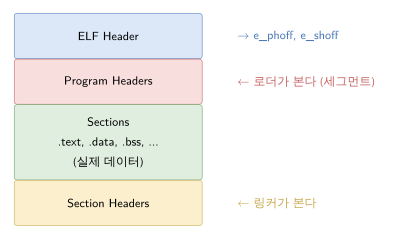
- Program Headers — Segment 정의. 로더가 본 그대로 mmap.
- Section Headers — Section 정의. 링커가 본 그대로 조합.
같은 데이터를 두 시각으로 봅니다. 한 세그먼트(PT_LOAD)가 여러 섹션(.text, .rodata, .init)을 포함하는 게 일반적.
#readelf로 들여다보기
$ readelf -h /usr/bin/lsELF Header: Magic: 7f 45 4c 46 02 01 01 00 00 00 00 00 00 00 00 00 Class: ELF64 Data: 2's complement, little endian Version: 1 (current) OS/ABI: UNIX - System V ABI Version: 0 Type: DYN (Position-Independent Executable file) Machine: Advanced Micro Devices X86-64 Version: 0x1 Entry point address: 0x67d0 Start of program headers: 64 (bytes into file) Start of section headers: 151456 (bytes into file) Flags: 0x0 Size of this header: 64 (bytes) Size of program headers: 56 (bytes) Number of program headers: 13 Size of section headers: 64 (bytes) Number of section headers: 32 Section header string table index: 31#ELF Header 구조
C로 표현 (Elf64_Ehdr, <elf.h>).
typedef struct { unsigned char e_ident[EI_NIDENT]; // 16 bytes magic + 식별 정보 Elf64_Half e_type; // 파일 종류 Elf64_Half e_machine; // 아키텍처 Elf64_Word e_version; Elf64_Addr e_entry; // 진입점 주소 Elf64_Off e_phoff; // Program Header 시작 오프셋 Elf64_Off e_shoff; // Section Header 시작 오프셋 Elf64_Word e_flags; Elf64_Half e_ehsize; // 이 헤더의 크기 Elf64_Half e_phentsize; // Program Header 한 개의 크기 Elf64_Half e_phnum; // Program Header 개수 Elf64_Half e_shentsize; Elf64_Half e_shnum; Elf64_Half e_shstrndx; // section name 문자열 테이블 인덱스} Elf64_Ehdr;#e_ident[0..15]
[0..3] = 0x7F 'E' 'L' 'F' 매직[4] = EI_CLASS 1=ELF32, 2=ELF64[5] = EI_DATA 1=little endian, 2=big[6] = EI_VERSION 1[7] = EI_OSABI 0=SysV, 3=Linux, 9=FreeBSD, ...[8] = EI_ABIVERSION[9..15] padding#e_type
| 값 | 의미 |
|---|---|
| 1 (REL) | .o 재배치 가능 파일 |
| 2 (EXEC) | 실행 파일 (정적, 절대 주소) |
| 3 (DYN) | 동적 라이브러리 또는 PIE 실행 파일 |
| 4 (CORE) | core dump |
PIE(Position-Independent Executable)가 보안상 표준이 되면서 최신 실행 파일도 ET_DYN. 따라서 file 명령이 “shared object”라고 해도 실행 파일일 수 있음.
#e_machine
3 = i38640 = ARM (32-bit)62 = x86-64183 = ARM64 (AArch64)243 = RISC-V#Program Headers
$ readelf -l /usr/bin/lsElf file type is DYN (Position-Independent Executable file)Entry point 0x67d0There are 13 program headers, starting at offset 64
Program Headers: Type Offset VirtAddr PhysAddr FileSiz MemSiz Flg Align PHDR 0x0000000000000040 0x0000000000000040 0x0000000000000040 0x0002d8 0x0002d8 R 0x8 INTERP 0x0000000000000318 0x0000000000000318 0x0000000000000318 0x00001c 0x00001c R 0x1 [Requesting program interpreter: /lib64/ld-linux-x86-64.so.2] LOAD 0x0000000000000000 0x0000000000000000 0x0000000000000000 0x004690 0x004690 R 0x1000 LOAD 0x0000000000005000 0x0000000000005000 0x0000000000005000 0x012e85 0x012e85 R E 0x1000 LOAD 0x0000000000018000 0x0000000000018000 0x0000000000018000 0x008b40 0x008b40 R 0x1000 LOAD 0x0000000000021890 0x0000000000022890 0x0000000000022890 0x0011c0 0x0026e0 RW 0x1000 DYNAMIC 0x00000000000228a8 0x00000000000238a8 0x00000000000238a8 0x000200 0x000200 RW 0x8 NOTE 0x0000000000000338 0x0000000000000338 0x0000000000000338 0x000020 0x000020 R 0x8 NOTE 0x0000000000000358 0x0000000000000358 0x0000000000000358 0x000044 0x000044 R 0x4 GNU_PROPERTY 0x0000000000000338 0x0000000000000338 0x0000000000000338 0x000020 0x000020 R 0x8 GNU_EH_FRAME 0x000000000001cee4 0x000000000001cee4 0x000000000001cee4 0x000ac4 0x000ac4 R 0x4 GNU_STACK 0x0000000000000000 0x0000000000000000 0x0000000000000000 0x000000 0x000000 RW 0x10 GNU_RELRO 0x0000000000021890 0x0000000000022890 0x0000000000022890 0x001770 0x001770 R 0x1#Program Header 구조
typedef struct { Elf64_Word p_type; Elf64_Word p_flags; // R=4, W=2, X=1 Elf64_Off p_offset; // 파일 안의 위치 Elf64_Addr p_vaddr; // 로드된 가상 주소 Elf64_Addr p_paddr; // 물리 주소 (베어메탈 LMA) Elf64_Xword p_filesz; // 파일 안의 크기 Elf64_Xword p_memsz; // 메모리에서의 크기 (.bss 때문에 다를 수 있음) Elf64_Xword p_align;} Elf64_Phdr;#p_type 카탈로그
| 값 | 의미 |
|---|---|
| PT_LOAD | mmap해서 메모리에 로드할 영역 |
| PT_DYNAMIC | .dynamic 섹션의 위치 (동적 링크 메타) |
| PT_INTERP | /lib64/ld-linux.so 경로 |
| PT_NOTE | .note.* 섹션 (build-id 등) |
| PT_PHDR | Program Header 자체 |
| PT_TLS | Thread Local Storage 템플릿 |
| PT_GNU_EH_FRAME | .eh_frame_hdr 위치 (예외 처리 unwind 인덱스) |
| PT_GNU_STACK | 스택 권한 (X 비트가 0이면 NX 스택) |
| PT_GNU_RELRO | RELRO 영역 (relocation 후 read-only로 만들기) |
| PT_GNU_PROPERTY | GNU 속성 (CET 등) |
#LOAD 세그먼트의 디테일
p_filesz < p_memsz이면 .bss 같은 zero-init 영역. 파일에는 없고 로드 시 OS가 zero-fill.
p_paddr는 일반 ELF에선 무시 (커널이 사용 안 함). 베어메탈 ELF의 LMA로 쓰입니다 — 임베디드 빌드 시 .data의 paddr이 flash 주소.
#RELRO
PT_GNU_RELRO ← 이 영역이LOAD (RW) ← 이 LOAD 안에 있음로더가 동적 링크 후 이 영역을 mprotect(R only)로 만듭니다. GOT(Global Offset Table) 같은 링크 후 변하지 않는 데이터를 보호 → 일부 ROP 공격 차단.
#Section Headers
$ readelf -S /usr/bin/lsThere are 32 section headers, starting at offset 0x24f60:
Section Headers: [Nr] Name Type Address Offset Size EntSize Flg [ 0] NULL 0000000000000000 000000 000000 000000 0 [ 1] .interp PROGBITS 0000000000000318 000318 00001c 000000 A [ 2] .note.gnu.proper NOTE 0000000000000338 000338 000020 000000 A [ 3] .note.gnu.build-i NOTE 0000000000000358 000358 000024 000000 A [ 4] .note.ABI-tag NOTE 000000000000037c 00037c 000020 000000 A [ 5] .gnu.hash GNU_HASH 00000000000003a0 0003a0 0000d8 000000 A [ 6] .dynsym DYNSYM 0000000000000478 000478 000ab0 000018 AL [ 7] .dynstr STRTAB 0000000000000f28 000f28 0009ac 000000 A [ 8] .gnu.version VERSYM 00000000000018d4 0018d4 0000e4 000002 AL [ 9] .gnu.version_r VERNEED 00000000000019c0 0019c0 000080 000000 AL [10] .rela.dyn RELA 0000000000001a40 001a40 001758 000018 AL [11] .rela.plt RELA 0000000000003198 003198 0014d0 000018 AILo [12] .init PROGBITS 0000000000005000 005000 00001b 000000 AX [13] .plt PROGBITS 0000000000005020 005020 000df0 000010 AX [14] .plt.got PROGBITS 0000000000005e10 005e10 000018 000010 AX [15] .plt.sec PROGBITS 0000000000005e30 005e30 000dd0 000010 AX [16] .text PROGBITS 0000000000006c00 006c00 010f95 000000 AX [17] .fini PROGBITS 0000000000017b98 017b98 00000d 000000 AX [18] .rodata PROGBITS 0000000000018000 018000 004ed5 000000 A [19] .eh_frame_hdr PROGBITS 000000000001ced8 01ced8 000ad0 000000 A [20] .eh_frame PROGBITS 000000000001d9a8 01d9a8 002b18 000000 A [21] .init_array INIT_ARRAY 0000000000022890 021890 000008 000008 WA [22] .fini_array FINI_ARRAY 0000000000022898 021898 000008 000008 WA [23] .data.rel.ro PROGBITS 00000000000228a0 0218a0 000008 000000 WA [24] .dynamic DYNAMIC 00000000000238a8 0228a8 000200 000010 WA [25] .got PROGBITS 0000000000023aa8 022aa8 000598 000008 WA [26] .data PROGBITS 0000000000024040 023040 0001a0 000000 WA [27] .bss NOBITS 00000000000241e0 0231e0 000d90 000000 WA [28] .comment PROGBITS 0000000000000000 0231e0 00002b 000001 MS [29] .gnu.build.attrib LOOS+0xffffff5 0000000000027ed0 023210 005ae8 000000 o [30] .symtab SYMTAB 0000000000000000 023210 008298 000018 33 [31] .strtab STRTAB 0000000000000000 02b4a8 003af4 000000 0#Section Header 구조
typedef struct { Elf64_Word sh_name; // 섹션 이름 (.shstrtab 인덱스) Elf64_Word sh_type; Elf64_Xword sh_flags; Elf64_Addr sh_addr; // VMA (메모리 주소) Elf64_Off sh_offset; // 파일 오프셋 Elf64_Xword sh_size; Elf64_Word sh_link; // 의존하는 다른 섹션 Elf64_Word sh_info; Elf64_Xword sh_addralign; Elf64_Xword sh_entsize; // 고정 크기 엔트리 (예: dynsym 24바이트)} Elf64_Shdr;#sh_type 카탈로그
| 값 | 의미 |
|---|---|
| NULL | 0번 (placeholder) |
| PROGBITS | 일반 데이터 (.text, .data, .rodata) |
| SYMTAB | 정적 심볼 테이블 (.symtab) |
| STRTAB | 문자열 테이블 (.strtab, .dynstr, .shstrtab) |
| RELA | relocation, addend 포함 (.rela.*) |
| REL | relocation, addend 없음 |
| HASH | 심볼 해시 테이블 (.hash) |
| DYNAMIC | 동적 링크 정보 (.dynamic) |
| NOTE | 노트 (.note.*) |
| NOBITS | 파일에 없음 (.bss) |
| INIT_ARRAY | 초기화 함수 포인터 배열 |
| FINI_ARRAY | 종료 함수 포인터 배열 |
| GNU_HASH | GNU 확장 해시 (.gnu.hash) |
| GNU_VERSYM | 심볼 버전 인덱스 |
| GNU_VERNEED | 버전 의존 |
#sh_flags
| 비트 | 의미 |
|---|---|
| 0x1 (WRITE) | 쓰기 가능 |
| 0x2 (ALLOC) | 메모리 할당 |
| 0x4 (EXECINSTR) | 실행 가능 |
| 0x10 (MERGE) | 동일 내용 병합 가능 (.rodata) |
| 0x20 (STRINGS) | NUL-terminated string |
| 0x40 (INFO_LINK) | sh_info가 다른 섹션 인덱스 |
| 0x80 (LINK_ORDER) | 링크 순서 보존 |
| 0x100 (OS_NONCONFORMING) | OS별 |
| 0x200 (GROUP) | 섹션 그룹 |
| 0x400 (TLS) | thread-local |
| 0x800 (COMPRESSED) | 압축됨 (.zdebug_*) |
#Dynamic Linking — .dynamic
$ readelf -d /usr/bin/lsDynamic section at offset 0x228a8 contains 27 entries: Tag Type Name/Value 0x0000000000000001 (NEEDED) Shared library: [libselinux.so.1] 0x0000000000000001 (NEEDED) Shared library: [libc.so.6] 0x000000000000000c (INIT) 0x5000 0x000000000000000d (FINI) 0x17b98 0x0000000000000019 (INIT_ARRAY) 0x22890 0x000000000000001b (INIT_ARRAYSZ) 8 (bytes) 0x000000000000001a (FINI_ARRAY) 0x22898 0x000000000000001c (FINI_ARRAYSZ) 8 (bytes) 0x000000006ffffef5 (GNU_HASH) 0x3a0 0x0000000000000005 (STRTAB) 0xf28 0x0000000000000006 (SYMTAB) 0x478 0x000000000000000a (STRSZ) 2476 (bytes) 0x000000000000000b (SYMENT) 24 (bytes) ...각 엔트리가 (d_tag, d_val_or_ptr). ld.so가 프로세스 시작 시 이 정보를 읽어 라이브러리를 로드·심볼을 바인딩.
| d_tag | 의미 |
|---|---|
| DT_NEEDED | 의존 라이브러리 이름 |
| DT_PLTRELSZ / DT_PLTGOT / DT_HASH | PLT/GOT/해시 위치 |
| DT_STRTAB / DT_SYMTAB | 문자열·심볼 테이블 |
| DT_RPATH / DT_RUNPATH | 라이브러리 검색 경로 |
| DT_INIT / DT_FINI | C++ ctor/dtor 함수 |
| DT_GNU_HASH | GNU 빠른 해시 |
| DT_VERNEED | 심볼 버전 요구 |
#PLT / GOT
printf를 호출할 때 첫 호출엔 ld.so가 실제 주소를 lookup. 두 번째 호출부터는 바로 점프.
[caller] call printf@plt ← PLT 슬롯[plt] jmp *GOT[printf] ← 첫 호출엔 resolver, 이후엔 실제 주소[got] [resolver | resolved address]이 lazy binding이 시작 시간 단축. 큰 라이브러리(libQt5 등)에서 효과 큼.
LD_BIND_NOW=1로 모든 심볼을 시작 시 해결 — 더 안전(Full RELRO와 결합).
#DT_RUNPATH vs LD_LIBRARY_PATH
| 경로 출처 | 검색 순서 |
|---|---|
| DT_RPATH (deprecated) | 1순위 |
| LD_LIBRARY_PATH | 2 (DT_RPATH 없으면) |
| DT_RUNPATH | 3 |
| /etc/ld.so.cache | 4 |
| /lib, /usr/lib | 5 |
patchelf --set-rpath로 변경 가능.
#Symbol Table
$ readelf -s /usr/bin/ls | head -20Symbol table '.dynsym' contains 114 entries: Num: Value Size Type Bind Vis Ndx Name 0: 0000000000000000 0 NOTYPE LOCAL DEFAULT UND 1: 0000000000000000 0 FUNC GLOBAL DEFAULT UND free@GLIBC_2.2.5 (2) 2: 0000000000000000 0 FUNC GLOBAL DEFAULT UND abort@GLIBC_2.2.5 (2) 3: 0000000000000000 0 FUNC GLOBAL DEFAULT UND __errno_location@GLIBC_2.2.5 4: 0000000000000000 0 FUNC GLOBAL DEFAULT UND strncpy@GLIBC_2.2.5 ....dynsym은 동적 링크용. .symtab은 정적/디버깅용 (stripped 빌드는 제거).
#Symbol 구조
typedef struct { Elf64_Word st_name; // 이름 (.strtab 인덱스) unsigned char st_info; // 타입 + 바인딩 unsigned char st_other; // visibility Elf64_Half st_shndx; // 정의된 섹션 Elf64_Addr st_value; // 주소 또는 값 Elf64_Xword st_size;} Elf64_Sym;#st_info 비트
Type (low 4 bits):
- 0 = NOTYPE
- 1 = OBJECT (변수)
- 2 = FUNC
- 3 = SECTION
- 4 = FILE
- 5 = COMMON
- 6 = TLS
Binding (high 4 bits):
- 0 = LOCAL
- 1 = GLOBAL
- 2 = WEAK (override 가능)
WEAK 심볼이 묘함 — 동명 GLOBAL이 있으면 그게 우선. malloc fork 같은 libc 함수가 WEAK. 그래서 __libc_malloc이 strong, malloc이 weak — 사용자가 자신만의 malloc을 정의하면 WEAK가 override 됨 (LD_PRELOAD).
#Build-ID — debuginfo 매칭
$ readelf -n /usr/bin/ls | grep "Build ID" Build ID: 4...8d3a91f0e5a3...링커가 --build-id 옵션으로 생성. 기본은 SHA-1 of section content. 이 ID가 바이너리의 정체성.
활용:
/usr/lib/debug/.build-id/4f/8d3a91...debug디렉터리에 별도 debuginfo 파일.- core dump의 build-id로 어떤 빌드인지 파악.
- debuginfod로 네트워크 자동 다운로드.
# build-id로 debuginfo 찾기$ build_id=$(readelf -n /usr/bin/ls | awk '/Build ID/ {print $3}')$ ls /usr/lib/debug/.build-id/${build_id:0:2}/${build_id:2}.debug#NOTE 섹션
$ readelf -n /usr/bin/lsDisplaying notes found in: .note.gnu.property Owner Data size Description GNU 0x00000010 NT_GNU_PROPERTY_TYPE_0 Properties: x86 feature: IBT, SHSTK
Displaying notes found in: .note.gnu.build-id Owner Data size Description GNU 0x00000014 NT_GNU_BUILD_ID (unique build ID bitstring) Build ID: 4f8d3a91f0e5a3...
Displaying notes found in: .note.ABI-tag Owner Data size Description GNU 0x00000010 NT_GNU_ABI_TAG (ABI version tag) OS: Linux, ABI: 3.2.0각 NOTE가 (name, type, descriptor) 트리플. 다양한 메타데이터:
- 빌드 정보 (build-id).
- ABI 호환성 (커널 버전).
- 보안 기능 (IBT, SHSTK, BTI for ARM64).
- 패키지 정보 (배포판이 추가).
NOTE는 세그먼트로도 노출됨 (PT_NOTE) — core dump가 활용. core dump의 PT_NOTE가 NT_PRSTATUS(레지스터) 등을 담는 이유 (이 시리즈 Ch 6에서 자세히).
#보안 — checksec
$ checksec --file=/usr/bin/lsRELRO STACK CANARY NX PIE RPATH RUNPATHFull RELRO Canary found NX enabled PIE enabled No RPATH No RUNPATH| 보호 | 의미 | ELF에서 |
|---|---|---|
| RELRO | GOT 등 보호 | PT_GNU_RELRO 세그먼트 |
| Stack Canary | 스택 overflow 검출 | __stack_chk_fail 심볼 |
| NX | 비실행 스택 | PT_GNU_STACK의 X 비트 |
| PIE | ASLR | e_type=DYN |
| FORTIFY | libc 함수 안전 변형 | __*_chk 심볼 |
#ELF 변형
같은 ELF 포맷 위에 변형이 있습니다.
- Linux glibc ELF — 일반적인 동적 링크.
- musl ELF — Alpine, 작은 정적 링크.
- Android Bionic — 일부 호환 차이.
- Baremetal ELF —
arm-none-eabi-gcc출력. 동적 링크 없음. p_paddr이 LMA. - Linux Kernel vmlinux — 동적 링크 없지만 모듈 (.ko) 재배치 사용.
도구 (readelf, objdump, objcopy)는 거의 같지만 플래그·기본값에 차이.
#도구 한 표
| 도구 | 용도 |
|---|---|
readelf | ELF 정보 전체 보기 |
objdump | 디스어셈블 + 더 |
objcopy | 변환 (strip, debuginfo 분리, bin/hex) |
nm | 심볼 목록 |
strings | 모든 NUL-terminated string |
addr2line | 주소 → 소스 (DWARF 사용) |
c++filt | mangled 이름 → 원본 |
patchelf | RPATH/INTERPRETER 변경 |
llvm-readelf / llvm-objdump | LLVM 버전 (대체 호환) |
#정리
- ELF는 링커 시각 (섹션) + 로더 시각 (세그먼트) 두 가지를 동시에.
- ELF Header가 나머지 모든 것의 인덱스.
- Program Header가 mmap 단위, Section Header가 링크 단위.
- LOAD 세그먼트의 p_filesz < p_memsz면 zero-init (.bss).
.dynamic이 동적 링크의 모든 메타데이터.- PLT/GOT가 lazy binding 메커니즘.
- Symbol bind는 GLOBAL/LOCAL/WEAK, type은 FUNC/OBJECT 등.
.note.gnu.build-id가 바이너리의 정체성 — debuginfo 매칭의 핵심.- Linux 보안 기능들은 모두 ELF 메타데이터로 표현.
#다음 장 예고
Ch 2 — DWARF 개관. DIE 트리, abbrev table, 컴파일 유닛, 모든 DW_TAG와 DW_AT 카탈로그.
#관련 항목
DWARF and ELF Internals · 1 of 6
- 1 ELF 포맷 분해 — Section·Segment·Symbol Table 구조 추적
- 2 DWARF 디버그 정보 분해 — DIE 트리와 .debug_abbrev
- 3 DWARF .debug_line 분석 — Source-to-PC 매핑 바이트코드 VM
- 4 DWARF .debug_loc 분석 — Variable Location Expression VM
- 5 DWARF Call Frame Information — .debug_frame과 .eh_frame 분해
- 6 DWARF 도구 생태계 — split-DWARF·dwz·debuginfod·pyelftools
관련 글
DWARF 디버그 정보 분해 — DIE 트리와 .debug_abbrev
DWARF의 정체. DIE/abbrev 인코딩, 컴파일 유닛, TAG/AT/FORM 카탈로그.
같은 시리즈에서 이어 읽기
DWARF .debug_line 분석 — Source-to-PC 매핑 바이트코드 VM
DWARF 줄 정보의 정체. 상태 머신, 표준/확장 opcode, file table, addr2line의 내부.
같은 시리즈에서 이어 읽기
ELF와 MAP 파일 분석 — 베어메탈 메모리 레이아웃 추적
ELF의 LMA/VMA, 링커 스크립트, MAP 파일로 메모리 진단, startup 코드의 정체.
공통 태그 기반 추천
이 글을 참조하는 글 (8)
- ELF Core 파일 포맷 분해 — NT_PRSTATUS·NT_PRPSINFO·NT_FILE — Postmortem Debugging
- RTOS-aware 디버깅과 트러블슈팅 — Task·Queue·Stack 분석 — Embedded Debugging
- ELF와 MAP 파일 분석 — 베어메탈 메모리 레이아웃 추적 — Embedded Debugging
- 리눅스 커널 디버깅 개론 — User/Kernel 경계와 도구 선택 — Kernel Debugging
- DWARF 디버그 정보 — 디버거가 변수와 라인을 찾는 방식 — GDB and LLDB
- GDB vs LLDB 분석 — 두 디버거의 설치·차이·선택 기준 — GDB and LLDB
- DWARF 도구 생태계 — split-DWARF·dwz·debuginfod·pyelftools — DWARF and ELF Internals
- DWARF 디버그 정보 분해 — DIE 트리와 .debug_abbrev — DWARF and ELF Internals