OpenOCD 심화 분석 — Configuration·Adapter·Target 통합
OpenOCD(Open On-Chip Debugger)는 오픈 소스 임베디드 디버그 데몬입니다. 거의 모든 프로브와 거의 모든 칩을 다루며, TCL 인터프리터가 내장돼 있어 모든 동작을 스크립트로 자동화할 수 있습니다. 이 장은 OpenOCD를 블랙박스로 두지 않고 그 안쪽 — TCL 명령 체계·flash driver·target 정의·custom 명령 — 까지 본격적으로 다룹니다.
#내부 구조
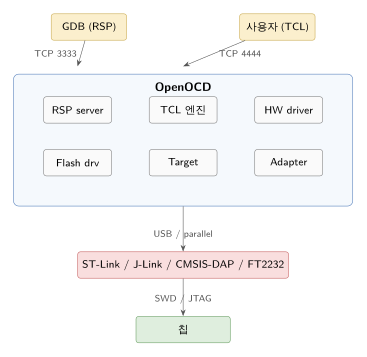
핵심 분리:
- Adapter driver: 프로브 USB·통신 (ST-Link, CMSIS-DAP, J-Link, FT2232, JLink ARM, …).
- Target driver: 칩의 코어 동작 (cortex_m, cortex_a, riscv, esp32, mips_m4k, …).
- Flash driver: 칩별 flash 프로그래밍 알고리즘 (stm32f4x, nrf5, lpc1xxx, atmel_at91sam7x, esp32, …).
- TCL 인터프리터: 위 셋을 묶고 사용자 명령으로 노출.
설정 파일이 interface와 target으로 분리되는 이유.
#실행과 설정
$ openocd -f interface/stlink.cfg -f target/stm32f4x.cfg또는 한 줄 명령으로.
$ openocd -d3 \ -c "source [find interface/cmsis-dap.cfg]" \ -c "transport select swd" \ -c "source [find target/nrf52.cfg]" \ -c "adapter speed 4000" \ -c "init" \ -c "reset halt"-c는 TCL 명령. 여러 번 누적되며 마지막에 init이 자동으로 실행되거나 명시적으로.
-d3는 디버그 레벨 3(최대). 신호 무결성 문제 추적에 유용.
$ openocd -d3 2> /tmp/openocd.log문제 발생 시 /tmp/openocd.log에 모든 SWD 트랜잭션이 남습니다.
#포트
| 포트 | 용도 |
|---|---|
| 3333 | GDB RSP |
| 4444 | telnet (사용자 TCL 셸) |
| 6666 | TCL RPC (스크립트 자동화) |
$ telnet localhost 4444> reset halt> mdw 0x20000000 16> flash write_image erase firmware.elf4444는 사람용. TCL 명령을 직접 입력하면서 칩을 두드립니다. CI 자동화는 6666(JSON-RPC 비슷)으로.
#설정 파일이 어디 있나
$ openocd --search-dir/usr/share/openocd/scripts
$ ls /usr/share/openocd/scripts/board/ # 보드 단위 (interface + target 묶음)chip/cpld/cpu/fpga/interface/ # 프로브 종류target/ # 칩 종류test/tools/-f 인자의 파일을 search-dir에서 찾습니다. 자체 cfg는 ~/.openocd/ 또는 프로젝트 디렉터리에.
#interface 설정
$ cat interface/stlink.cfgadapter driver hlahla_layout stlinkhla_device_desc "ST-LINK"hla_vid_pid 0x0483 0x3744 0x0483 0x3748 0x0483 0x374b ...
$ cat interface/cmsis-dap.cfgadapter driver cmsis-dapadapter driver가 어떤 드라이버를 쓸지. hla는 High-Level Adapter — ST-Link 같은 폐쇄 펌웨어 프로브용 추상 계층. raw SWD 명령을 못 보내고 고수준 명령만 (예: “메모리 X 읽기”). 일부 디버깅 기능(예: Watchpoint with mask)이 제한됩니다.
CMSIS-DAP, J-Link, FT2232는 raw SWD를 지원해 모든 OpenOCD 기능 사용 가능.
# interface 설정 예 (CMSIS-DAP 권장)source [find interface/cmsis-dap.cfg]transport select swd # 또는 jtagadapter speed 4000 # kHzadapter speed가 너무 빠르면 신호 깨짐, 너무 느리면 굽기·디버깅 둔함. 보통 1000~8000 KHz.
#target 설정
$ cat target/stm32f4x.cfg# 일부 발췌source [find target/swj-dp.tcl]source [find mem_helper.tcl]
if { [info exists CHIPNAME] } { set _CHIPNAME $CHIPNAME } else { set _CHIPNAME stm32f4x }if { [info exists WORKAREASIZE] } { set _WORKAREASIZE $WORKAREASIZE } else { set _WORKAREASIZE 0x4000 }
swj_newdap $_CHIPNAME cpu -irlen 4 -ircapture 0x01 -irmask 0x0f \ -expected-id 0x4ba00477 ...
dap create $_CHIPNAME.dap -chain-position $_CHIPNAME.cputarget create $_CHIPNAME.cpu cortex_m -dap $_CHIPNAME.dap
$_CHIPNAME.cpu configure -work-area-phys 0x20000000 -work-area-size $_WORKAREASIZE \ -work-area-backup 0
flash bank $_CHIPNAME.flash stm32f2x 0 0 0 0 $_CHIPNAME.cpu주요 명령:
| TCL 명령 | 의미 |
|---|---|
swj_newdap | JTAG 또는 SWD TAP 노드 정의 |
dap create | Debug Access Port 인스턴스 |
target create | CPU 타깃 생성 (cortex_m, cortex_a, riscv, …) |
flash bank | flash 메모리 영역 + driver 등록 |
configure | 타깃 추가 옵션 |
-work-area-phys / -work-area-size: flash 프로그래밍 시 SRAM의 임시 영역에 flash loader 코드를 올려야 하므로 사용 가능한 SRAM 영역을 지정.
-work-area-backup: 0이면 work area를 백업하지 않음 (빠르지만 프로그래밍 후 SRAM이 망가짐 → reset 필수).
#init과 reset
init # 모든 자원 초기화 후 GDB 포트 열기reset # 칩 리셋 (run 모드)reset halt # 리셋 + 즉시 haltreset init # 리셋 + halt + reset-init 이벤트 핸들러 실행reset init이 자주 쓰임. reset 직후에 외부 클럭으로 전환 같은 작업을 reset-init 이벤트로 등록할 수 있기 때문.
$_TARGETNAME configure -event reset-init { # 외부 클럭으로 전환 mww 0x40023800 0x00000001 sleep 2 # 워치독 비활성화 mww 0x40002000 0x12345678}이벤트 종류.
| 이벤트 | 시점 |
|---|---|
examine-start | 디버그 진입 직전 |
examine-end | 디버그 진입 직후 |
reset-start | reset 신호 전 |
reset-assert-pre | SRST 적용 전 |
reset-assert-post | SRST 적용 후 |
reset-deassert-pre | SRST 해제 전 |
reset-deassert-post | SRST 해제 후 |
reset-init | 위 모든 reset 끝난 직후 |
reset-end | reset 시퀀스 완료 |
gdb-attach | GDB가 붙음 |
gdb-detach | GDB가 나감 |
gdb-halt / gdb-resume | halt/resume 명령 |
gdb-flash-erase-start/end | flash erase |
gdb-flash-write-start/end | flash 쓰기 |
resume-start/end | resume |
#TCL 인터프리터 — 모든 것이 명령
OpenOCD의 거의 모든 동작이 TCL 명령. 사용자가 telnet으로 들어가면 TCL 셸에 있습니다.
# 메모리 읽기·쓰기 (m=memory, d=display, w=word, h=halfword, b=byte)mdw 0x20000000 16 # 16 워드 (4바이트) displaymdh 0x20000000 16 # halfwordmdb 0x20000000 64 # 바이트mww 0x20000100 0xdeadbeef # word writemwh 0x20000100 0x1234mwb 0x20000100 0xff
# 레지스터reg # 모든 레지스터reg pc # PC만reg r0 0x12345678 # R0에 쓰기
# 실행 제어halt # haltresume # resume (현재 PC에서)resume 0x08000124 # 특정 PC부터step # single step
# Flashflash banks # 등록된 flash 정보flash erase_sector 0 0 lastflash write_image erase fw.elfflash write_image fw.bin 0x08000000flash verify_image fw.elfflash protect 0 0 last on # 보호TCL 자체의 문법(변수, if, for, proc)도 다 됩니다.
proc dump_regs {} { set names {r0 r1 r2 r3 r4 r5 r6 r7 r8 r9 r10 r11 r12 sp lr pc xpsr} foreach n $names { set v [reg $n] echo "$n = $v" }}
# 사용dump_regsecho가 telnet 출력. puts는 stdout (데몬 stderr).
#proc 등록과 namespace
proc my_init {} { reset halt flash erase_sector 0 0 last flash write_image fw.elf reset halt resume}이후 my_init만 치면 끝. CI 자동화의 핵심.
#Custom 명령 — 한 보드 한 cfg
자체 보드용 종합 cfg.
source [find interface/cmsis-dap.cfg]transport select swdadapter speed 4000
source [find target/nrf52.cfg]
# 자체 명령 추가proc flash_app {filename} { reset halt flash erase_sector 0 0 last flash write_image $filename verify_image $filename reset echo "$filename flashed and running"}
proc dump_rtt {} { rtt setup 0x20000000 0x10000 "SEGGER RTT" rtt start rtt server start 9090 0 echo "RTT server on localhost:9090"}
# reset 후 외부 클럭으로 전환$_TARGETNAME configure -event reset-init { mww 0x40000700 1 sleep 10}$ openocd -f board/my_custom.cfg$ telnet localhost 4444> flash_app /home/me/build/fw.elf> dump_rtt팀 단위로 이런 cfg를 공유해 모든 개발자 환경을 표준화.
#Flash driver의 안쪽
load 또는 flash write_image가 어떻게 동작하나? Flash driver의 일반 시퀀스.
- Erase — flash 컨트롤러에 erase 명령 (FLASH_KEYR unlock + FLASH_CR ERASE 비트 + STRT).
- Algorithm load — flash word write 알고리즘 코드를 SRAM의 work area로 복사.
- Algorithm run — 알고리즘에 (목적지 주소, 데이터 버퍼 주소, 길이)를 인자로 줘 칩 CPU가 직접 flash를 굽도록.
- Verify — 다시 읽어 비교.
알고리즘을 SRAM에 두고 CPU로 돌리는 이유는 대역폭. SWD 단일 워드 쓰기로 64KB를 굽는 건 수십 초; 칩 CPU가 SRAM의 데이터를 flash에 쓰면 flash 자체 속도로.
OpenOCD 소스 src/flash/nor/*.c 파일들에 칩별 알고리즘. 새 칩 지원은 그 칩의 Reference Manual의 flash 쓰기 시퀀스를 코드로.
#Async 쓰기
OpenOCD 0.11+의 flash write_image는 async transfer를 사용 — 호스트가 다음 청크를 USB로 보내는 동안 칩 CPU는 이전 청크를 flash에 굽습니다. 대역폭이 ~2배 향상.
#RTT (Real-Time Transfer)
OpenOCD 0.11+는 Segger RTT를 호환 구현.
# RTT 설정rtt setup 0x20000000 0x10000 "SEGGER RTT" # 컨트롤 블록 검색 영역rtt startrtt server start 9090 0 # 채널 0 → localhost:9090rtt server start 9091 1 # 채널 1 → 9091$ nc localhost 9090[펌웨어의 RTT 채널 0 stdout 실시간]J-Link RTT보다 폴링 빈도가 낮아 (수십 Hz vs 수백 Hz) 살짝 둔하지만 충분.
#SWO / ITM trace
# TPIU 설정 (코어 클럭 + SWO baud)tpiu config internal /tmp/swo.log uart off 168000000 2000000
# 또는 외부 출력 (J-Trace 같은 캡처)tpiu config external uart 168000000 2000000
# ITM 포트 활성화itm port 0 on # stdout 채널itm port 1 onitm ports on # 모든 채널 (32개)internal은 OpenOCD가 파일에 저장. external은 별도 캡처 도구.
#Multi-core
Cortex-A9 + Cortex-M3 같은 비대칭 멀티프로세싱 (i.MX6, OMAP4) 또는 듀얼 Cortex-A 같은 대칭 SoC.
# 두 개의 cortex_a + 한 개의 cortex_mswj_newdap $_CHIPNAME cpu -irlen 4 ...dap create $_CHIPNAME.dap -chain-position $_CHIPNAME.cpu
target create $_CHIPNAME.a9_0 cortex_a -dap $_CHIPNAME.dap -ap-num 0 -coreid 0target create $_CHIPNAME.a9_1 cortex_a -dap $_CHIPNAME.dap -ap-num 0 -coreid 1target create $_CHIPNAME.m3 cortex_m -dap $_CHIPNAME.dap -ap-num 1
# 각 코어가 별도 GDB 포트 (3333, 3334, 3335)$_CHIPNAME.a9_0 configure -gdb-port 3333$_CHIPNAME.a9_1 configure -gdb-port 3334$_CHIPNAME.m3 configure -gdb-port 3335GDB 세션을 각각 띄워 두 코어를 따로 디버깅. 한 GDB에서 멀티 인페리어로 둘을 같이 볼 수도 있지만 도구 체인 한계.
#SMP
대칭 멀티 코어는 target smp 명령으로 한 그룹.
target smp $_CHIPNAME.a9_0 $_CHIPNAME.a9_1이러면 한 GDB가 모든 코어를 자동 추적하며, halt가 모든 코어에 적용됩니다.
#RTOS-aware
$_TARGETNAME configure -rtos FreeRTOS$_TARGETNAME configure -rtos auto # 자동 검출활성화되면 GDB의 info threads가 OS task 목록을 보여 줍니다. 베어메탈 디버깅에서 매우 유용 — 각 task의 멈춰 있는 위치를 동시에.
지원 RTOS: FreeRTOS, embKernel, ChibiOS, eCos, ThreadX, mqx, nuttx, RIOT, Zephyr, hwthread.
내부적으로 OpenOCD가 RTOS의 task control block 구조를 알고 메모리에서 직접 파싱합니다. RTOS 펌웨어에 별도 패치는 필요 없지만 일부는 심볼이 있어야 (디버그 빌드 또는 ELF 제공).
#보안 — RDP / readout protection
# STM32 RDP 상태 확인stm32f4x option_read 0> stm32f4x.cpu option byte 0: 0xaaffff5500ff
# RDP 해제 (모든 flash 지워짐!)stm32f4x unlock 0reset initstm32f4x option_write 0 0xaa 0xffL1 → L0 전환 시 flash 전체 erase는 보안 설계. 디버거가 펌웨어를 못 들춰보게 lock한 칩을 풀려면 펌웨어를 잃는다가 핵심 가드.
L2(완전 차단)는 영구 — 어떤 OpenOCD 명령으로도 풀리지 않습니다.
#debug log 활용
$ openocd -d3 2>&1 | tee /tmp/openocd.log레벨 0~4. 3이면 모든 SWD 트랜잭션, 4면 더 (USB raw). 신호 무결성 의심 시 4까지.
Debug: 1234 1ms targets.c:2032 cortex_m_examine() Cortex-M4 r0p1 processor detectedDebug: 1235 1ms cortex_m.c:2189 cortex_m_examine() cpuid: 0x410fc241Debug: 1236 1ms target.c:1672 target_read_u32() addr: 0xe000ed00Debug: 1237 2ms transport.c:227 jtag_libusb_bulk_read() 64 bytes read in 0ms각 줄이 SWD/DAP 트랜잭션 한 단위 가까이. 끊김의 어느 단계에서 일어났는지 정확히 파악 가능.
#자동화 — CI
#!/usr/bin/env bash# fw-test.sh — CI에서 보드 펌웨어 검증
set -e
# 1. 새 펌웨어 굽기 + resetopenocd -f board/my.cfg -c "init; reset halt; \ flash erase_sector 0 0 last; \ flash write_image firmware.elf; \ reset run; \ sleep 100; \ shutdown"
# 2. UART 콘솔에서 부팅 로그 검증timeout 30 cat /dev/ttyACM0 > /tmp/boot.log &sleep 5
if grep -q "BOOT OK" /tmp/boot.log; then echo "PASS"else echo "FAIL" cat /tmp/boot.log exit 1fi자체 하드웨어 룰의 기본 CI. 큰 회사면 보드 farm + 자동 굽기 + 자동 테스트.
#자주 만나는 문제
| 증상 | 원인 / 해법 |
|---|---|
Error: unable to find a matching CMSIS-DAP device | udev 룰 누락 — /etc/udev/rules.d/99-openocd.rules |
Target voltage: 0.000V | Vref 미연결, 또는 타깃 전원 안 들어옴 |
Cannot examine target | reset 시퀀스 잘못 — reset_config srst_only srst_nogate 시도 |
Error: target requires examination first | init 안 했음, 또는 SWD 통신 깨짐 |
flash bank not found | target cfg에 flash bank 누락 |
wrong device, expected 0x... | IDCODE 불일치 — 잘못된 target cfg |
| flash erase 후 다시 안 굽힘 | RDP lock, 또는 work area 부족 |
| 매우 느린 굽기 | adapter speed 너무 낮음 또는 work-area-backup=1 |
| RTT 안 보임 | 검색 영역 잘못, 또는 컨트롤 블록 magic이 안 찍힘 |
Error: nrf52.cpu -- clearing lock sequence ... | nRF의 APPROTECT lock — nrf5 mass_erase로 풀기 |
#정리
- OpenOCD = TCL 인터프리터 + adapter/target/flash driver.
- interface.cfg + target.cfg 조합.
- 4444 telnet으로 TCL 명령 직접 실행.
mdw/mww/reg/reset halt/flash write_image가 일상.reset-init이벤트로 외부 클럭·워치독 등 boot 후 작업.- proc로 custom 명령 → 팀 표준화.
- Flash driver는 SRAM에 알고리즘 올려 칩 CPU로 굽기.
- RTT, ITM/SWO, RTOS-aware 모두 OpenOCD가 통합.
-d3가 신호 문제 추적의 마지막 무기.
#다음 장 예고
Ch 4 — J-Link / Segger 도구 체인. J-Link GDB Server, J-Run, J-Trace, Unlimited Flash Breakpoints, RTT.
#관련 항목
- Ch 2: JTAG / SWD / CoreSight
- Ch 4: J-Link 도구 체인
- OpenOCD 공식 문서
- TCL 8.6 reference — TCL 문법
- OpenOCD 소스:
src/flash/nor/,src/target/,src/transport/
Embedded Debugging · 3 of 9
- 1 GDB Remote Serial Protocol 분석 — 디버거-타겟 통신 메커니즘
- 2 JTAG·SWD·CoreSight 분석 — ARM 디버그 인터페이스 비교
- 3 OpenOCD 심화 분석 — Configuration·Adapter·Target 통합
- 4 J-Link 도구 체인 분석 — JLinkExe·RTT·GDB Server 활용
- 5 ELF와 MAP 파일 분석 — 베어메탈 메모리 레이아웃 추적
- 6 임베디드 Trace 비교 — RTT·ITM·SWO·ETM·Semihosting 선택
- 7 RTOS-aware 디버깅과 트러블슈팅 — Task·Queue·Stack 분석
- 8 CXL Link Training 디버깅 — LTSSM 상태와 Protocol Analyzer 활용
- 9 CXL 디바이스 트러블슈팅 — RAS 이벤트·Poison List·Media Error 추적
관련 글
J-Link 도구 체인 분석 — JLinkExe·RTT·GDB Server 활용
JLinkGDBServer, JLinkExe, J-Run, J-Trace, Unlimited Flash BP, RTT, Ozone.
같은 시리즈에서 이어 읽기
ELF와 MAP 파일 분석 — 베어메탈 메모리 레이아웃 추적
ELF의 LMA/VMA, 링커 스크립트, MAP 파일로 메모리 진단, startup 코드의 정체.
같은 시리즈에서 이어 읽기
임베디드 Flash Layout 설계 — partition·NAND·eMMC·UBI 비교
양산 firmware의 flash layout 설계 — 부트로더·env·kernel·rootfs·OTA slot의 sizing과 NAND/eMMC/UBI 차이.
공통 태그 기반 추천