PMU·HPM 하드웨어 카운터 분석 — 정밀 성능 진단
#한 줄 요약
**“PMU = CPU 내장 프로파일러”**입니다. 측정 overhead가 거의 0에 가깝습니다.
#ARMv8 PMU 구조
| 항목 | 사양 |
|---|---|
| Counter 수 | Cortex-A53 = 6, A72 = 6, M-class = 4~ |
| Counter 폭 | 32-bit (overflow interrupt) |
| Cycle counter | 별도 64-bit (PMCCNTR_EL0) |
| Event 선택 | 각 counter에 event ID 할당 |
/* User mode access 활성화 (kernel 권한 필요) */asm volatile ("msr pmuserenr_el0, %0" :: "r"(1));asm volatile ("msr pmcntenset_el0, %0" :: "r"(0x80000000)); // CCNT enableasm volatile ("msr pmcr_el0, %0" :: "r"(1)); // PMU enable
uint64_t cycles;asm volatile ("mrs %0, pmccntr_el0" : "=r"(cycles));#ARMv8 표준 Event IDs
| ID | 이름 | 의미 |
|---|---|---|
| 0x00 | SW_INCR | 소프트 카운터 |
| 0x01 | L1I_CACHE_REFILL | L1 I-cache miss |
| 0x03 | L1D_CACHE_REFILL | L1 D-cache miss |
| 0x04 | L1D_CACHE | L1 D-cache access |
| 0x08 | INST_RETIRED | 명령 완료 |
| 0x10 | BR_MIS_PRED | branch mispredict |
| 0x11 | CPU_CYCLES | cycle (CCNT와 동일) |
| 0x13 | MEM_ACCESS | memory access |
| 0x17 | L2D_CACHE_REFILL | L2 miss |
| 0x18 | L2D_CACHE_ACCESS | L2 access |
| 0x23 | STALL_FRONTEND | front-end stall |
| 0x24 | STALL_BACKEND | back-end stall |
각 CPU별 Technical Reference Manual을 확인해야 합니다. CPU마다 implementation-specific event가 추가로 정의되어 있습니다.
#Linux perf — 가장 흔한 도구
# 기본 측정perf stat ./prog
# 특정 eventperf stat -e cycles,instructions,branches,branch-misses ./prog
# Raw event (PMU 직접)perf stat -e r03,r04 ./prog # L1D_CACHE_REFILL, L1D_CACHEperf stat -e r23,r24 ./prog # STALL_FRONTEND, STALL_BACKEND
# Profilingperf record -e cycles -g ./progperf reportperf record 결과로 function별 cycle 분포를 확인할 수 있고, 이를 통해 hotspot을 발견합니다.
#핵심 비율 — IPC·MPKI
MPKI < 10 — cache 효율 좋음MPKI 10-30 — 보통MPKI > 30 — cache 문제
5% 미만이면 양호, 10% 초과면 문제입니다.
둘 합이 50% 이상이면 stall 지배적입니다.
#Top-Down Microarchitecture Analysis
Intel이 먼저 도입했고, ARM도 비슷한 분류 체계를 사용합니다.
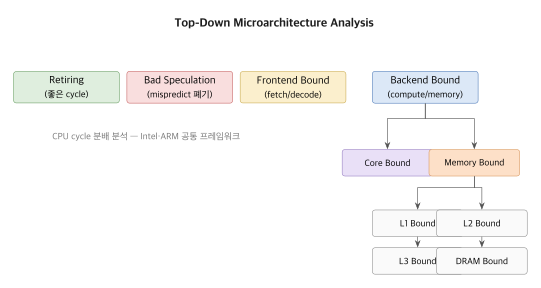
Bottleneck을 식별한 뒤 적절한 최적화를 적용합니다. cache miss라면 tiling, mispredict라면 branchless 변환이 그 예입니다.
#Cortex-M PMU
Cortex-M3/M4는 작은 PMU를 가집니다.
DWT->CTRL |= DWT_CTRL_CYCCNTENA_Msk;uint32_t cycles_start = DWT->CYCCNT;/* code */uint32_t cycles_end = DWT->CYCCNT;Cortex-M7 이상은 LSU·FOLD·CPI 등 추가 counter를 제공합니다.
DWT->LSUCNT // load/store cycleDWT->CPICNT // CPI miss (extra) cycleDWT->EXCCNT // exception overheadDWT->FOLDCNT // folded instruction (e.g. IT)DWT->SLEEPCNT // sleep cyclefloat cpi = (float)(DWT->CPICNT + DWT->CYCCNT) / DWT->CYCCNT;#RISC-V HPM (Hardware Performance Monitor)
mcycle — cycle counter (64-bit)minstret — instruction retiredmhpmcounter3 — mhpmcounter31 — 28 programmable countermhpmevent3 — mhpmevent31 — event ID 선택Event ID는 vendor마다 다릅니다. SiFive U74 예시는 다음과 같습니다.
| ID | 의미 |
|---|---|
| 0x100 | I-cache miss |
| 0x101 | I-cache busy |
| 0x800 | D-cache miss |
| 0x801 | D-cache busy |
| 0x100A | Branch mispredict |
asm volatile ("csrw mhpmevent3, %0" :: "r"(0x800)); // D-cache missuint64_t count;asm volatile ("csrr %0, mhpmcounter3" : "=r"(count));#Sampling — Statistical Profiling
perf record -F 1000 -g ./prog # 1000 Hz samplingperf report --stdio매 1 ms마다 PC와 call stack을 캡쳐합니다. Flamegraph로 시각화하면 다음과 같습니다.
perf script | stackcollapse-perf.pl | flamegraph.pl > flame.svgoverhead가 1-3% 정도로 매우 적어서 production 환경에서도 사용할 수 있습니다.
#Streamline (ARM) / VTune (Intel)
대표적인 GUI 도구들은 다음과 같습니다.
- ARM Streamline: Cortex-A/M target에서 perf 데이터를 수집합니다.
- Intel VTune: Top-down 자동 분석을 제공합니다.
- Apple Instruments: macOS·iOS용입니다.
- NVIDIA Nsight: GPU와 CPU를 함께 봅니다.
학습 곡선이 가파르지만 강력합니다.
#자동차·항공 — RTOS PMU 활용
자동차 ECU(NXP S32K3, Cortex-M7)에서는 PMU로 WCET 분석을 수행합니다.
void task(void) { uint32_t start = DWT->CYCCNT; do_work(); uint32_t cycles = DWT->CYCCNT - start;
if (cycles > WCET_BUDGET) { log_overrun(cycles); // 디버깅용 }}KSLV-II 누리 flight computer에서도 task별 cycle budget을 측정해 안전 마진을 확보합니다.
#Event Multiplexing
PMU counter는 6개인데 측정하고 싶은 event가 12개라면 time-sharing이 필요합니다.
perf stat -e r03,r04,r10,r11,r17,r23,r24 ./prog# 6 이하면 동시, 초과시 자동 multiplex# perf가 결과를 normalize (scaling factor)다만 sampling 방식이라 정확도는 떨어집니다. 가능하면 측정 event 수를 counter 수 이하로 유지하는 것이 좋습니다.
#자주 하는 실수
⚠️ Cycle 측정에 barrier 누락
uint32_t start = DWT->CYCCNT;do_work();uint32_t end = DWT->CYCCNT;OoO CPU에서는 do_work 시작이 start 측정 전에 일어날 수도 있습니다. 다음과 같이 barrier를 넣습니다.
__DSB(); __ISB();uint32_t start = DWT->CYCCNT;do_work();__DSB(); __ISB();uint32_t end = DWT->CYCCNT;⚠️ Counter overflow
32-bit 카운터를 1 GHz에서 돌리면 약 4초만에 overflow가 납니다. 긴 측정에서는 overflow handler를 두거나 64-bit cycle counter(ARMv8 PMCCNTR)를 사용합니다.
⚠️ User-mode PMU 접근
기본적으로 PMU 접근은 kernel mode 전용입니다. Linux에서는 /proc/sys/kernel/perf_event_paranoid로 제어합니다.
echo 0 | sudo tee /proc/sys/kernel/perf_event_paranoid # user accessProduction 서버에서는 보안 위험이 있으므로 신중하게 적용해야 합니다.
⚠️ ISR이 측정 손상
PMU counter는 ISR도 함께 카운트합니다. ISR이 빈번하면 측정 결과에 노이즈가 섞입니다. ISR-free 구간을 잡거나, 측정에서 ISR을 빼는 방법을 씁니다.
#정리
- PMU는 CPU 내장 hardware counter입니다. overhead가 거의 0입니다.
- ARMv8은 6개 counter와 별도의 cycle counter를 제공합니다.
- 핵심 metric은 IPC, MPKI, mispredict rate, STALL입니다.
- Linux
perf가 사실상 표준 도구입니다. - Cortex-M은 DWT counter, Cortex-A는 PMU를 씁니다.
- RISC-V는
mhpmcounter로 programmable counter를 제공합니다. - WCET 검증, hotspot 파악, top-down 분석에 핵심적인 도구입니다.
다음 파트에서는 Compiler & Optimization을 다룹니다.
#관련 항목
- 2-09: SIMD NEON
- 3-01: Compiler 최적화 단계
Embedded Performance Engineering · 19 of 57
- 1 Embedded Performance Engineering — 임베디드 성능 엔지니어링 시리즈 소개
- 2 임베디드 성능 분석 방법론 — Measure → Analyze → Optimize 사이클
- 3 성능 지표 정의 — Latency·Throughput·Utilization 분석
- 4 성능 측정의 기본 — Wall-Clock·CPU Cycle·Instruction Count
- 5 성능 데이터 통계적 분석 — Percentile·Histogram·평균의 함정
- 6 실시간 성능 분석 — WCET·Jitter·Deadline Miss 측정
- 7 임베디드 벤치마킹 기초 — 재현성·Warmup·노이즈 제거
- 8 성능 모델링 — Amdahl·Gustafson·Roofline Model 적용
- 9 프로파일링 기법 개요 — Sampling vs Instrumentation·PGO·LTO
- 10 CPU 파이프라인 분석 — 5-stage·Cortex-M·Cortex-A 비교
- 11 Pipeline Stall 분석 — Data·Structural·Control Hazard·Forwarding
- 12 Branch Prediction 분석 — Static·2-bit·BTB·BHT·Mispredict 비용
- 13 Speculative Execution 분석 — OoO·Reorder Buffer·Register Renaming
- 14 CPU Cache 기초 — L1·L2·L3·Set Associative·Replacement Policy
- 15 Cache Miss 3C Model 분석 — Compulsory·Capacity·Conflict
- 16 Cache Line 최적화 — Alignment·Prefetch·False Sharing 처리
- 17 메모리 대역폭 분석 — STREAM·Roofline·Bus Saturation 측정
- 18 SIMD·NEON 활용 — 128-bit Vector·Auto-Vectorization·SVE/SVE2
- 19 PMU·HPM 하드웨어 카운터 분석 — 정밀 성능 진단
- 20 임베디드 Bus Architecture — AHB·AXI·CHI 진화와 5-Channel
- 21 Bus Contention 진단 — Arbitration·QoS·Starvation 측정
- 22 DMA 성능 최적화 — Burst·Scatter-Gather·Chain·Cache 일관성
- 23 DMA vs CPU Copy 성능 비교 — Break-even·Setup Overhead 실측
- 24 Interrupt Latency 분석 — 진입·종료·Tail-Chaining·Late Arrival
- 25 Interrupt Storm 처리 — NAPI·Rate-Limit·Polling 전환
- 26 MMIO 접근 성능 — Cache Policy·Write-Combining·Volatile·Barrier
- 27 Peripheral Clock 분석 — PLL·Divider·Gating·DVFS
- 28 Power vs Performance 트레이드오프 — DVFS·Race-to-Idle·Big.LITTLE
- 29 Thermal Throttling 분석 — Junction Temp·Trip Point·냉각
- 30 CXL Interconnect 분석 — AI 시대 메모리 대역폭 확장
- 31 Concurrency 기초 — Concurrency vs Parallelism·Race·Memory Model
- 32 False Sharing 진단 — Cache Line Ping-Pong·Padding·측정
- 33 Lock Contention 분석 — Wait·Hold·Convoy·측정 기법
- 34 Spinlock 성능 분석 — Spin-Wait vs Context Switch·Ticket·MCS
- 35 Mutex 성능 분석 — Futex·Adaptive·Priority Inheritance
- 36 Reader-Writer Lock 성능 — Reader/Writer Priority·RCU·Seqlock
- 37 Lock-Free 자료구조 성능 — CAS·ABA·Hazard Pointer·Epoch Reclamation
- 38 Memory Ordering 분석 — Acquire·Release·Seq-Cst·ARM Relaxed Model
- 39 Cache Coherency 프로토콜 — MESI·MOESI·Snoop·Directory
- 40 SMP 성능 분석 — Per-Core·Affinity·Load Balance·Scalability
- 41 Linux perf 기초 — stat·record·report 활용
- 42 Linux perf 고급 — Raw Event·Tracepoint·perf script
- 43 ftrace 활용 — function·function_graph·latency tracer
- 44 eBPF·bpftrace 동적 트레이싱 — 커널 무수정 관측
- 45 Flamegraph 분석 — On-CPU·Off-CPU·Differential
- 46 ARM DS·Lauterbach 분석 — Hardware Trace 전문 도구
- 47 Bare-metal 프로파일링 — GPIO·DWT·SysTick·ITM 활용
- 48 NVIDIA Nsight Systems — GPU·NPU 포함 시스템 분석
- 49 모던 프로파일러 비교 — Tracy·Hotspot·uftrace·Coz
- 50 연속 프로파일링 — Parca·Pixie·Pyroscope·Tetragon
- 51 실전 사례 — ISR Latency 100µs Deadline Miss 추적
- 52 실전 사례 — Matrix Multiply가 예상의 10배 느린 이유
- 53 실전 사례 — 8-core가 4-core를 넘으면 throughput이 떨어지는 이유
- 54 실전 사례 — 카메라 1080p 60fps가 30fps로 떨어지는 이유
- 55 CXL.mem 지연·대역폭 실측 — Direct·Switch·Pooled 토폴로지 비교
- 56 CXL 성능 프로파일링 도구 — cxl-cli·DAMON·perf-mem 활용
- 57 실전 사례 — CXL.mem 추가로 LLM inference KV cache 처리량 회복
관련 글
임베디드 Bus Architecture — AHB·AXI·CHI 진화와 5-Channel
ARM AMBA — AHB·APB·AXI·ACE·CHI. AXI 5 channel, burst, outstanding transaction.
같은 시리즈에서 이어 읽기
Bus Contention 진단 — Arbitration·QoS·Starvation 측정
Round-robin·priority·QoS arbitration. Master 다수 시 starvation. AXI QoS·BUSY counter.
같은 시리즈에서 이어 읽기
Practical RTOS Internals — 실시간 커널 내부 분석 시리즈 소개
RTOS를 사용하는 것이 아니라 이해하고 구현하는 법. Scheduler, context switch, memory allocator의 내부 동작을 소스 코드 수준에서 분석합니다.
공통 태그 기반 추천
이 글을 참조하는 글 (5)
- JTAG·SWD 안 붙을 때 — 핀·전압·속도·세션 진단 — Modern Embedded Recipes
- Linux perf 기초 — stat·record·report 활용 — Embedded Performance Engineering
- 임베디드 Bus Architecture — AHB·AXI·CHI 진화와 5-Channel — Embedded Performance Engineering
- SIMD·NEON 활용 — 128-bit Vector·Auto-Vectorization·SVE/SVE2 — Embedded Performance Engineering
- 성능 측정의 기본 — Wall-Clock·CPU Cycle·Instruction Count — Embedded Performance Engineering