실전 사례 — 카메라 1080p 60fps가 30fps로 떨어지는 이유
#한 줄 요약
“CPU가 한가한데 throughput이 모자란다면 bus와 DMA를 의심해야 합니다.”
#증상 — 보고된 문제
카메라 영상을 캡처해 디스크에 저장하는 프로토타입에서 frame drop이 보고됐습니다.
| 항목 | 값 |
|---|---|
| HW | Cortex-A53 quad-core, 1.2 GHz, MIPI CSI-2 input |
| 요구 | 1080p (1920×1080) YUV422, 60 fps → 1920 × 1080 × 2 × 60 = 248 MB/s |
증상은 다음 세 가지였습니다.
- 안정적으로 캡처되는 것은 30 fps까지였습니다.
- 60 fps로 설정하면 frame drop이 50%에 달했습니다.
- 그런데도 CPU idle이 70% 이상으로 여유가 많았습니다.
CPU가 한가한데 throughput이 모자라는 전형적인 비-CPU bound 문제였습니다. 처음에는 카메라 센서나 ISP 자체의 한계를 의심했지만, 데이터시트상 센서는 60 fps를 지원했습니다.
#가설 1 — CPU 처리 부하
먼저 CPU 부하를 확인했습니다.
top -H -p $(pidof capture_app)
# PID USER %CPU COMMAND# 1234 root 28.0 capture_app# 1235 root 15.0 cap_dma_thread# 1236 root 8.0 cap_format# 1237 root 4.0 cap_writer캡처 데몬의 모든 thread를 합쳐도 60% 미만. 코어별로 봐도 가장 바쁜 코어가 40% 정도였습니다.
perf stat으로 IPC도 확인했습니다.
perf stat -p $(pidof capture_app) sleep 10
# 1.61 insn per cycle# 0.8% branch-miss# 4.2% cache-missIPC 1.6은 정상 범위였고 cache miss나 branch miss도 문제 수준이 아니었습니다. CPU는 일이 없어서 놀고 있었지 막혀 있는 것이 아니었습니다.
가설 1 기각: CPU 처리는 병목이 아닙니다.
#가설 2 — DMA 성능 부족
CPU가 한가하다면 다음 의심은 데이터 전송 경로입니다. MIPI CSI-2 receiver → DMA → DDR 경로 어딘가에서 throughput이 부족해 보였습니다.
먼저 DMA 컨트롤러의 통계 레지스터를 읽었습니다.
/* 디버그 코드 */printf("DMA xfer count: %u\n", read_reg(DMA_XFER_CNT));printf("DMA error: %u\n", read_reg(DMA_ERR_STATUS));printf("DMA active: %u%%\n", read_reg(DMA_BUSY_PCT));
# DMA xfer count: 124000000# DMA error: 0# DMA active: 98%DMA channel이 98% busy. 거의 항상 일하고 있다는 뜻이지만 이상하게도 throughput은 124 MB/s에 머물고 있었습니다. 이론 bandwidth(DDR3-1600 single-channel 6.4 GB/s)의 2% 수준이었습니다.
AXI bus 효율이 의심됐습니다. 로직 분석기(Saleae 대안으로 SoC가 제공하는 AXI performance monitor)를 붙여 bus transaction을 측정했습니다.
AXI master ports utilization: cam_dma: 98% cpu: 12% gpu: 3% total: ~50% (overlapping)
cam_dma transaction profile: avg burst length: 16 beats beat width: 8 byte → per transaction: 128 byte inter-transaction overhead: ~20 cycles effective efficiency: 50%DMA가 매 transaction마다 128 byte만 전송하고 20 cycle을 idle로 보내고 있었습니다. AXI bus 효율 50%로 throughput의 절반을 overhead로 까먹는 구조였습니다.
가설 2 확정: DMA burst size가 너무 작습니다.
#원인 — Burst Size와 Descriptor 모델
DMA 컨트롤러 드라이버를 확인하니 burst size가 default 16 beat로 설정되어 있었습니다. 데이터시트는 최대 256 beat까지 지원했습니다.
Burst size 16 beat × 8 byte = 128 byte/transactionOverhead 20 cycle @ 1 GHz = 20 ns/transactionUseful transfer: 128 byte / (128/6.4 GB/s + 20 ns) = 128 byte / (20 ns + 20 ns) = 3.2 GB/s × 효율 → 단일 transaction 효율 50%
Burst size 256 beat × 8 byte = 2048 byte/transactionUseful transfer: 2048 byte / (320 ns + 20 ns) = ~94% 효율이론적으로 burst size를 16배 키우면 효율이 50% → 94%로 올라갑니다.
추가로 캡처 드라이버가 single descriptor 방식으로 동작하고 있었습니다. 한 frame을 받으면 CPU가 IRQ에서 다음 descriptor를 setup하고 DMA를 재시동하는 구조였습니다. Setup latency 동안 DMA가 idle 상태였습니다.
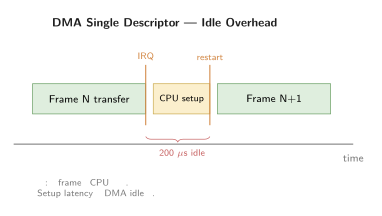
60 fps 기준 frame interval 16.6 ms에서 200 us / 16.6 ms = 1.2% 손실처럼 작아 보이지만, 실제로는 frame end-of-line 사이에도 동일 패턴이 발생합니다.
#해결 — Burst Size, Scatter-Gather, Double Buffer
세 가지 변경을 동시에 적용했습니다.
Step 1: Burst size 16 → 256 beat
/* Device tree */&cam_dma { snps,axi-config = <&axi_cfg>;};
&axi_cfg { snps,max-burst-len = <256>; snps,wr-osr-lmt = <15>; /* outstanding write */ snps,rd-osr-lmt = <15>; /* outstanding read */};또는 드라이버 코드에서 직접 설정합니다.
dma_slave_config cfg = { .direction = DMA_DEV_TO_MEM, .src_maxburst = 256, .dst_maxburst = 256,};dmaengine_slave_config(chan, &cfg);DDR3 controller가 256 beat burst를 한 번에 처리하면 row open/close overhead가 분산되어 efficiency가 크게 올라갑니다.
Step 2: Scatter-gather descriptor chain
Single descriptor 대신 ring of descriptors를 미리 만들어 둡니다. 한 frame이 끝나면 hardware가 자동으로 다음 descriptor로 넘어가 CPU 개입이 필요 없습니다.
#define N_DESC 8
struct cam_descriptor desc[N_DESC];dma_addr_t buf[N_DESC];
for (int i = 0; i < N_DESC; i++) { buf[i] = dma_alloc_coherent(dev, FRAME_SIZE, &dma_handle, GFP_KERNEL); desc[i].buf_addr = dma_handle; desc[i].buf_len = FRAME_SIZE; desc[i].next = &desc[(i + 1) % N_DESC]; /* ring */}
dma_engine_start_chain(chan, &desc[0]);이제 CPU는 frame ready 통지만 받고 buffer를 user space로 전달합니다. DMA setup overhead가 사라집니다.
Step 3: Double buffer로 latency hiding
DMA가 다음 frame을 받는 동안 user thread가 이전 frame을 처리합니다. Producer-consumer ring으로 구현합니다.
ring_buffer_t *rb;
/* IRQ handler */void on_frame_done(int idx){ ring_buffer_publish(rb, idx);}
/* Consumer thread */void *processor(void *arg){ while (1) { int idx = ring_buffer_consume(rb); process_frame(buf[idx]); ring_buffer_release(rb, idx); }}DMA와 CPU가 서로 다른 buffer를 동시에 다루므로 frame interval 전체를 활용할 수 있습니다.
#검증 — Before / After
각 변경의 효과를 단계적으로 측정했습니다.
| 단계 | DMA throughput | AXI eff. | 캡처 fps | Frame drop |
|---|---|---|---|---|
| Original | 124 MB/s | 50% | 30 | 50% |
| Burst 256 | 230 MB/s | 92% | 56 | 7% |
| + SG chain | 245 MB/s | 95% | 59 | 2% |
| + Double buffer | 248 MB/s | 96% | 60 | 0.01% |
목표 248 MB/s에 안정적으로 도달했고 1080p 60fps frame drop이 사실상 사라졌습니다. AXI 효율도 50% → 96%로 회복했습니다.
CPU 사용률은 변화 없이 60% 정도를 유지했습니다. DMA 변경이 CPU에는 영향을 주지 않고 transport 효율만 개선한 결과였습니다.
#교훈
이번 사례에서 얻은 교훈을 정리합니다.
- CPU가 한가한데 throughput 부족 = bus 또는 I/O 의심.
top에서 idle이 보이는데 throughput이 안 나오면 CPU는 범인이 아닙니다. DMA, bus, peripheral controller, 또는 memory subsystem 어딘가에서 막혀 있습니다. - DMA burst size는 첫 점검 대상. 많은 driver의 default가 보수적인 값(16 beat 등)입니다. Hardware가 지원하는 최대값에 가깝게 올리면 큰 효과를 봅니다. DDR controller의 row open/close cost가 burst length로 분산되기 때문입니다.
- AXI performance monitor를 활용. SoC가 제공하는 bus performance counter는 거의 사용되지 않지만, throughput 문제 진단에서 결정적인 정보를 줍니다. Datasheet의 PMU 챕터를 꼭 읽어 둡니다.
- Single descriptor는 안티패턴. 모든 frame/transaction마다 CPU 개입이 필요한 구조는 latency hiding이 불가능합니다. Descriptor chain 또는 ring을 미리 만들어 hardware가 자율적으로 동작하게 합니다.
- Double buffer로 idle time 제거. Producer와 consumer가 다른 buffer를 동시에 다루는 패턴은 DMA뿐 아니라 GPU, NPU, codec 등 모든 throughput-critical 경로에서 표준입니다.
- 측정 없이 가정하지 말 것. “DMA가 충분히 빠르겠지”, “burst size는 적당하겠지” 같은 가정이 50% 효율을 그대로 두는 원인이었습니다. 한 번 측정하면 즉시 보입니다.
가장 큰 교훈은 시스템 성능 진단을 CPU 안에만 가두지 않는 것입니다. 임베디드 시스템은 CPU, memory, bus, peripheral이 한 묶음으로 동작하며, 어느 한 곳의 효율이 떨어지면 전체 throughput이 그 한계에 묶입니다. CPU만 측정하는 도구로는 절반의 그림밖에 못 봅니다.
이 사례로 6장 case study series를 마칩니다. 다음은 7장 advanced topics로 PMU customization, ftrace plugin, kernel module level profiling 같은 주제로 들어갑니다.
#관련 항목
Embedded Performance Engineering · 54 of 57
- 1 Embedded Performance Engineering — 임베디드 성능 엔지니어링 시리즈 소개
- 2 임베디드 성능 분석 방법론 — Measure → Analyze → Optimize 사이클
- 3 성능 지표 정의 — Latency·Throughput·Utilization 분석
- 4 성능 측정의 기본 — Wall-Clock·CPU Cycle·Instruction Count
- 5 성능 데이터 통계적 분석 — Percentile·Histogram·평균의 함정
- 6 실시간 성능 분석 — WCET·Jitter·Deadline Miss 측정
- 7 임베디드 벤치마킹 기초 — 재현성·Warmup·노이즈 제거
- 8 성능 모델링 — Amdahl·Gustafson·Roofline Model 적용
- 9 프로파일링 기법 개요 — Sampling vs Instrumentation·PGO·LTO
- 10 CPU 파이프라인 분석 — 5-stage·Cortex-M·Cortex-A 비교
- 11 Pipeline Stall 분석 — Data·Structural·Control Hazard·Forwarding
- 12 Branch Prediction 분석 — Static·2-bit·BTB·BHT·Mispredict 비용
- 13 Speculative Execution 분석 — OoO·Reorder Buffer·Register Renaming
- 14 CPU Cache 기초 — L1·L2·L3·Set Associative·Replacement Policy
- 15 Cache Miss 3C Model 분석 — Compulsory·Capacity·Conflict
- 16 Cache Line 최적화 — Alignment·Prefetch·False Sharing 처리
- 17 메모리 대역폭 분석 — STREAM·Roofline·Bus Saturation 측정
- 18 SIMD·NEON 활용 — 128-bit Vector·Auto-Vectorization·SVE/SVE2
- 19 PMU·HPM 하드웨어 카운터 분석 — 정밀 성능 진단
- 20 임베디드 Bus Architecture — AHB·AXI·CHI 진화와 5-Channel
- 21 Bus Contention 진단 — Arbitration·QoS·Starvation 측정
- 22 DMA 성능 최적화 — Burst·Scatter-Gather·Chain·Cache 일관성
- 23 DMA vs CPU Copy 성능 비교 — Break-even·Setup Overhead 실측
- 24 Interrupt Latency 분석 — 진입·종료·Tail-Chaining·Late Arrival
- 25 Interrupt Storm 처리 — NAPI·Rate-Limit·Polling 전환
- 26 MMIO 접근 성능 — Cache Policy·Write-Combining·Volatile·Barrier
- 27 Peripheral Clock 분석 — PLL·Divider·Gating·DVFS
- 28 Power vs Performance 트레이드오프 — DVFS·Race-to-Idle·Big.LITTLE
- 29 Thermal Throttling 분석 — Junction Temp·Trip Point·냉각
- 30 CXL Interconnect 분석 — AI 시대 메모리 대역폭 확장
- 31 Concurrency 기초 — Concurrency vs Parallelism·Race·Memory Model
- 32 False Sharing 진단 — Cache Line Ping-Pong·Padding·측정
- 33 Lock Contention 분석 — Wait·Hold·Convoy·측정 기법
- 34 Spinlock 성능 분석 — Spin-Wait vs Context Switch·Ticket·MCS
- 35 Mutex 성능 분석 — Futex·Adaptive·Priority Inheritance
- 36 Reader-Writer Lock 성능 — Reader/Writer Priority·RCU·Seqlock
- 37 Lock-Free 자료구조 성능 — CAS·ABA·Hazard Pointer·Epoch Reclamation
- 38 Memory Ordering 분석 — Acquire·Release·Seq-Cst·ARM Relaxed Model
- 39 Cache Coherency 프로토콜 — MESI·MOESI·Snoop·Directory
- 40 SMP 성능 분석 — Per-Core·Affinity·Load Balance·Scalability
- 41 Linux perf 기초 — stat·record·report 활용
- 42 Linux perf 고급 — Raw Event·Tracepoint·perf script
- 43 ftrace 활용 — function·function_graph·latency tracer
- 44 eBPF·bpftrace 동적 트레이싱 — 커널 무수정 관측
- 45 Flamegraph 분석 — On-CPU·Off-CPU·Differential
- 46 ARM DS·Lauterbach 분석 — Hardware Trace 전문 도구
- 47 Bare-metal 프로파일링 — GPIO·DWT·SysTick·ITM 활용
- 48 NVIDIA Nsight Systems — GPU·NPU 포함 시스템 분석
- 49 모던 프로파일러 비교 — Tracy·Hotspot·uftrace·Coz
- 50 연속 프로파일링 — Parca·Pixie·Pyroscope·Tetragon
- 51 실전 사례 — ISR Latency 100µs Deadline Miss 추적
- 52 실전 사례 — Matrix Multiply가 예상의 10배 느린 이유
- 53 실전 사례 — 8-core가 4-core를 넘으면 throughput이 떨어지는 이유
- 54 실전 사례 — 카메라 1080p 60fps가 30fps로 떨어지는 이유
- 55 CXL.mem 지연·대역폭 실측 — Direct·Switch·Pooled 토폴로지 비교
- 56 CXL 성능 프로파일링 도구 — cxl-cli·DAMON·perf-mem 활용
- 57 실전 사례 — CXL.mem 추가로 LLM inference KV cache 처리량 회복
관련 글
CXL.mem 지연·대역폭 실측 — Direct·Switch·Pooled 토폴로지 비교
CXL.mem 토폴로지별 실측 — Direct attach·Single switch·Multi-host pool의 지연·대역폭 비용 측정.
같은 시리즈에서 이어 읽기
CXL 성능 프로파일링 도구 — cxl-cli·DAMON·perf-mem 활용
CXL.mem 환경 성능 도구 — cxl-cli 토폴로지·DAMON page activity·perf-mem로 보는 CXL 트래픽·numastat 통계.
같은 시리즈에서 이어 읽기
C로 구현하는 Bus Functional Model — Driver 검증용 BFM 설계
Driver와 RTL 사이의 protocol-aware adapter.
공통 태그 기반 추천