False Sharing 진단 — Cache Line Ping-Pong·Padding·측정
#한 줄 요약
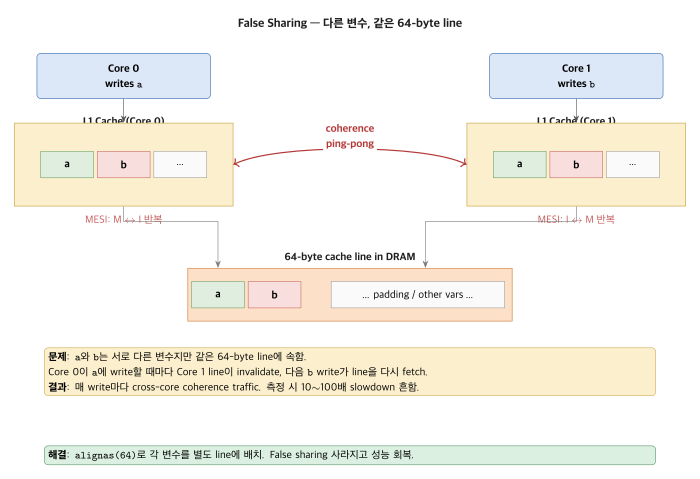
“False Sharing = 다른 변수, 같은 cache line” 입니다. 코어 간 ping-pong이 일어나 10~100배까지 느려집니다.
#메커니즘
struct { int counter_a; // CPU 0 사용 int counter_b; // CPU 1 사용} stats; // 8 byte — 같은 64-byte line
CPU 0: writes counter_a → cache line state = Modified (CPU 0) → CPU 1 line state = Invalid
CPU 1: writes counter_b → coherence protocol triggered → CPU 0 line evict (flush to L2) → CPU 1 fetch from L2 (or CPU 0 cache) → CPU 1 cache state = Modified → CPU 0 = Invalid매 access마다 line이 두 cache 사이를 왕복합니다(ping-pong). 실제로 공유되는 데이터는 하나도 없는데, 단지 같은 line에 들어 있다는 이유로 coherence가 계속 동작합니다.
그림으로 보면 두 코어가 같은 line을 두고 핑퐁하는 모습이 분명해집니다.
#MESI Protocol
M (Modified) — 이 cache만 valid, dirtyE (Exclusive) — 이 cache만 valid, cleanS (Shared) — 여러 cache valid, cleanI (Invalid) — 무효State 변화는 다음과 같이 일어납니다.
CPU 0 write: I → M, 다른 cache invalidate broadcastCPU 1 read after CPU 0 write: - CPU 0 cache의 M line → flush to memory - CPU 0: M → S, CPU 1: I → S
False sharing = 매번 M → I → M → I 반복.#측정 — 실 cycle
struct { atomic_int a; atomic_int b;} bad;
struct { alignas(64) atomic_int a; alignas(64) atomic_int b;} good;
void thread1_func(void *p) { for (int i = 0; i < 10M; i++) atomic_fetch_add(&bad.a, 1);}void thread2_func(void *p) { for (int i = 0; i < 10M; i++) atomic_fetch_add(&bad.b, 1);}Cortex-A72 4-core 환경에서 실측한 결과는 다음과 같습니다.
Bad (false sharing): 4.2 secGood (padded): 0.3 sec → 14x slowdown#Padding
struct counters { alignas(64) atomic_int a; char pad_a[64 - sizeof(atomic_int)];
alignas(64) atomic_int b; char pad_b[64 - sizeof(atomic_int)];};또는 C++17:
#include <new>struct alignas(std::hardware_destructive_interference_size) Counter { std::atomic<int> value;};
std::array<Counter, 4> counters; // 각 element가 다른 linehardware_destructive_interference_size는 일반적으로 64이고, Apple M1은 128입니다.
#흔한 false sharing 패턴
#1. Per-CPU 변수
int counters[NUM_CPUS]; // ← 8개 × 4 byte = 32 byte → 한 line 안each cpu: counters[cpu]++→ false sharingpadding을 넣거나 per-CPU memory로 분리해야 합니다.
struct counter_per_cpu { alignas(64) int value;};struct counter_per_cpu counters[NUM_CPUS];#2. Producer/Consumer Queue
struct queue { size_t head; // producer writes size_t tail; // consumer writes /* ... data ... */};producer와 consumer가 다른 코어에서 동작하면 head와 tail이 같은 line에 들어가서 ping-pong이 발생합니다.
struct queue { alignas(64) atomic_size_t head; char pad[64 - sizeof(atomic_size_t)]; alignas(64) atomic_size_t tail; char pad2[64 - sizeof(atomic_size_t)]; /* ... data ... */};#3. Spinlock 인접 데이터
struct { spinlock_t lock; int data1; // ← lock 잡힌 코어와 다른 코어가 동시 access 시 ping-pong int data2;} resource;lock과 data를 서로 다른 line에 분리해야 합니다.
#perf c2c — Cache-to-Cache 진단
sudo perf c2c record ./progsudo perf c2c report
# Output:# - HITM events (Hit in Modified state — false sharing 시그너처)# - Per-cache-line contention# - Source code locationLinux kernel 4.10 이상에서 사용할 수 있으며, false sharing을 탐지하는 가장 강력한 도구입니다.
#Intel VTune Memory Access
VTune의 Memory Access analysis는 다음과 같은 정보를 제공합니다.
- Per cache line latency
- Local vs Remote DRAM access
- Contended cache lines 보고
#Embedded — Cortex-A SMP
/* Linux on Cortex-A — 4 코어 */DEFINE_PER_CPU(int, my_counter); // 자동 padded
/* RTOS SMP — FreeRTOS 11 SMP 또는 Zephyr */static atomic_t counters[NUM_CORES] __attribute__((aligned(64)));Zephyr는 Z_KERNEL_STACK_DEFINE 등을 통해 자동으로 정렬을 맞춰 줍니다.
#False Sharing은 항상 나쁜가?
반드시 그렇지는 않습니다. Workload에 따라 다음과 같이 갈립니다.
- Read 위주 → 모든 cache S state, ping-pong 없음, OK
- Per-CPU 누적 → padding 필요
- 가끔 write → 측정해서 결정
모든 변수에 padding을 넣으면 line 하나당 실제 정보가 1 byte 수준으로 줄어 cache 효율이 떨어집니다.
#True Sharing — 진짜 공유 시
atomic_int global_counter;/* 모든 thread가 update */이런 경우는 진짜 공유이지 false sharing이 아닙니다. 해결책으로는 다음 두 가지가 있습니다.
- Per-CPU에서 누적한 뒤 주기적으로 합산
- Sharded counter
atomic_int counter[NUM_CPUS];
int total(void) { int sum = 0; for (i = 0) sum += counter[i]; return sum;}Read는 가끔이고 write가 자주 일어나는 경우라면 per-CPU shard를 쓰는 편이 좋습니다.
#Lock-free Queue 디자인
struct lockfree_spsc { alignas(64) atomic_size_t head; // producer-only alignas(64) atomic_size_t tail; // consumer-only alignas(64) T buf[CAPACITY]; // 별도 line};각 hot field가 서로 다른 line에 놓이도록 해서 false sharing을 0으로 만듭니다.
#자주 하는 실수
⚠️ 작은 변수만 padding
alignas(64) int a;int b; // ← a 같은 line에 들어감a 뒤 64 byte 영역은 다른 변수가 차지할 수 있습니다. 모든 변수에 alignas를 붙이거나 명시적으로 pad를 넣어야 합니다.
⚠️ Padding 안에 다른 data
struct foo { alignas(64) int a; char tmp[60]; alignas(64) int b; /* tmp 안 다른 데이터 두지 마라 — 그것도 line bouncing */};⚠️ Stack 변수 padding
void func(void) { alignas(64) int x; // ← stack alignment 보장 안 됨}GCC의 -mstackrealign 옵션을 쓰거나, 해당 변수를 heap이나 static 영역에 두는 방식으로 해결합니다.
⚠️ 작은 시스템에서 over-pad
/* Cortex-M7 — 32 byte cache line */alignas(64) int x; // ← 32 byte로 충분Embedded 환경에서는 cache line size를 확인한 다음 정확히 그 크기에 맞춰 align해야 합니다.
#정리
- False sharing은 다른 변수가 같은 line에 있어서 coherence ping-pong이 발생하는 현상입니다.
- 해결책은 line size에 맞춘
alignas(64)padding입니다. - 진단에는 perf c2c를 사용합니다.
- Producer/consumer queue와 per-CPU counter는 기본적으로 padding을 넣어야 합니다.
- True sharing은 별도의 문제이며, sharding으로 해결합니다.
- Cache line size는 Cortex-M7에서 32, 대부분의 CPU에서 64, Apple M1에서 128입니다.
다음 편은 Lock Contention을 다룹니다.
#관련 항목
Embedded Performance Engineering · 32 of 57
- 1 Embedded Performance Engineering — 임베디드 성능 엔지니어링 시리즈 소개
- 2 임베디드 성능 분석 방법론 — Measure → Analyze → Optimize 사이클
- 3 성능 지표 정의 — Latency·Throughput·Utilization 분석
- 4 성능 측정의 기본 — Wall-Clock·CPU Cycle·Instruction Count
- 5 성능 데이터 통계적 분석 — Percentile·Histogram·평균의 함정
- 6 실시간 성능 분석 — WCET·Jitter·Deadline Miss 측정
- 7 임베디드 벤치마킹 기초 — 재현성·Warmup·노이즈 제거
- 8 성능 모델링 — Amdahl·Gustafson·Roofline Model 적용
- 9 프로파일링 기법 개요 — Sampling vs Instrumentation·PGO·LTO
- 10 CPU 파이프라인 분석 — 5-stage·Cortex-M·Cortex-A 비교
- 11 Pipeline Stall 분석 — Data·Structural·Control Hazard·Forwarding
- 12 Branch Prediction 분석 — Static·2-bit·BTB·BHT·Mispredict 비용
- 13 Speculative Execution 분석 — OoO·Reorder Buffer·Register Renaming
- 14 CPU Cache 기초 — L1·L2·L3·Set Associative·Replacement Policy
- 15 Cache Miss 3C Model 분석 — Compulsory·Capacity·Conflict
- 16 Cache Line 최적화 — Alignment·Prefetch·False Sharing 처리
- 17 메모리 대역폭 분석 — STREAM·Roofline·Bus Saturation 측정
- 18 SIMD·NEON 활용 — 128-bit Vector·Auto-Vectorization·SVE/SVE2
- 19 PMU·HPM 하드웨어 카운터 분석 — 정밀 성능 진단
- 20 임베디드 Bus Architecture — AHB·AXI·CHI 진화와 5-Channel
- 21 Bus Contention 진단 — Arbitration·QoS·Starvation 측정
- 22 DMA 성능 최적화 — Burst·Scatter-Gather·Chain·Cache 일관성
- 23 DMA vs CPU Copy 성능 비교 — Break-even·Setup Overhead 실측
- 24 Interrupt Latency 분석 — 진입·종료·Tail-Chaining·Late Arrival
- 25 Interrupt Storm 처리 — NAPI·Rate-Limit·Polling 전환
- 26 MMIO 접근 성능 — Cache Policy·Write-Combining·Volatile·Barrier
- 27 Peripheral Clock 분석 — PLL·Divider·Gating·DVFS
- 28 Power vs Performance 트레이드오프 — DVFS·Race-to-Idle·Big.LITTLE
- 29 Thermal Throttling 분석 — Junction Temp·Trip Point·냉각
- 30 CXL Interconnect 분석 — AI 시대 메모리 대역폭 확장
- 31 Concurrency 기초 — Concurrency vs Parallelism·Race·Memory Model
- 32 False Sharing 진단 — Cache Line Ping-Pong·Padding·측정
- 33 Lock Contention 분석 — Wait·Hold·Convoy·측정 기법
- 34 Spinlock 성능 분석 — Spin-Wait vs Context Switch·Ticket·MCS
- 35 Mutex 성능 분석 — Futex·Adaptive·Priority Inheritance
- 36 Reader-Writer Lock 성능 — Reader/Writer Priority·RCU·Seqlock
- 37 Lock-Free 자료구조 성능 — CAS·ABA·Hazard Pointer·Epoch Reclamation
- 38 Memory Ordering 분석 — Acquire·Release·Seq-Cst·ARM Relaxed Model
- 39 Cache Coherency 프로토콜 — MESI·MOESI·Snoop·Directory
- 40 SMP 성능 분석 — Per-Core·Affinity·Load Balance·Scalability
- 41 Linux perf 기초 — stat·record·report 활용
- 42 Linux perf 고급 — Raw Event·Tracepoint·perf script
- 43 ftrace 활용 — function·function_graph·latency tracer
- 44 eBPF·bpftrace 동적 트레이싱 — 커널 무수정 관측
- 45 Flamegraph 분석 — On-CPU·Off-CPU·Differential
- 46 ARM DS·Lauterbach 분석 — Hardware Trace 전문 도구
- 47 Bare-metal 프로파일링 — GPIO·DWT·SysTick·ITM 활용
- 48 NVIDIA Nsight Systems — GPU·NPU 포함 시스템 분석
- 49 모던 프로파일러 비교 — Tracy·Hotspot·uftrace·Coz
- 50 연속 프로파일링 — Parca·Pixie·Pyroscope·Tetragon
- 51 실전 사례 — ISR Latency 100µs Deadline Miss 추적
- 52 실전 사례 — Matrix Multiply가 예상의 10배 느린 이유
- 53 실전 사례 — 8-core가 4-core를 넘으면 throughput이 떨어지는 이유
- 54 실전 사례 — 카메라 1080p 60fps가 30fps로 떨어지는 이유
- 55 CXL.mem 지연·대역폭 실측 — Direct·Switch·Pooled 토폴로지 비교
- 56 CXL 성능 프로파일링 도구 — cxl-cli·DAMON·perf-mem 활용
- 57 실전 사례 — CXL.mem 추가로 LLM inference KV cache 처리량 회복
관련 글
Lock Contention 분석 — Wait·Hold·Convoy·측정 기법
Wait time과 hold time, contention ratio를 측정하고 lock convoy를 회피하는 법.
같은 시리즈에서 이어 읽기
Spinlock 성능 분석 — Spin-Wait vs Context Switch·Ticket·MCS
Spinlock 비용 분석과 ticket lock, MCS lock의 scalability 차이.
같은 시리즈에서 이어 읽기
False Sharing 해결 — Cache Line Padding·SoA 적용
False sharing의 원리와 영향, perf c2c 감지, alignas(64) padding, per-CPU 변수, thread-local까지 해결 전략을 정리합니다.
공통 태그 기반 추천
이 글을 참조하는 글 (8)
- False Sharing 해결 — Cache Line Padding·SoA 적용 — Modern Embedded Recipes
- NUMA Memory Topology — numactl·numa_alloc·HBM 적용 — Modern Embedded Recipes
- Cache Line Alignment — alignas·Padding·SoA 적용 — Modern Embedded Recipes
- 실전 사례 — 8-core가 4-core를 넘으면 throughput이 떨어지는 이유 — Embedded Performance Engineering
- SMP 성능 분석 — Per-Core·Affinity·Load Balance·Scalability — Embedded Performance Engineering
- Cache Coherency 프로토콜 — MESI·MOESI·Snoop·Directory — Embedded Performance Engineering
- Lock Contention 분석 — Wait·Hold·Convoy·측정 기법 — Embedded Performance Engineering
- Concurrency 기초 — Concurrency vs Parallelism·Race·Memory Model — Embedded Performance Engineering